
Using the Reason Constraint on the Data Value Changed Filter
I'm trying to find out who had a lead score change from a specific smart campaign - would I use data value changed with a reason or some other filter?
The Data Value Change trigger/filter with the Reason constraint is appropriate for finding leads that had their Lead Score changed by something such as a manual edit or Smart Campaign.
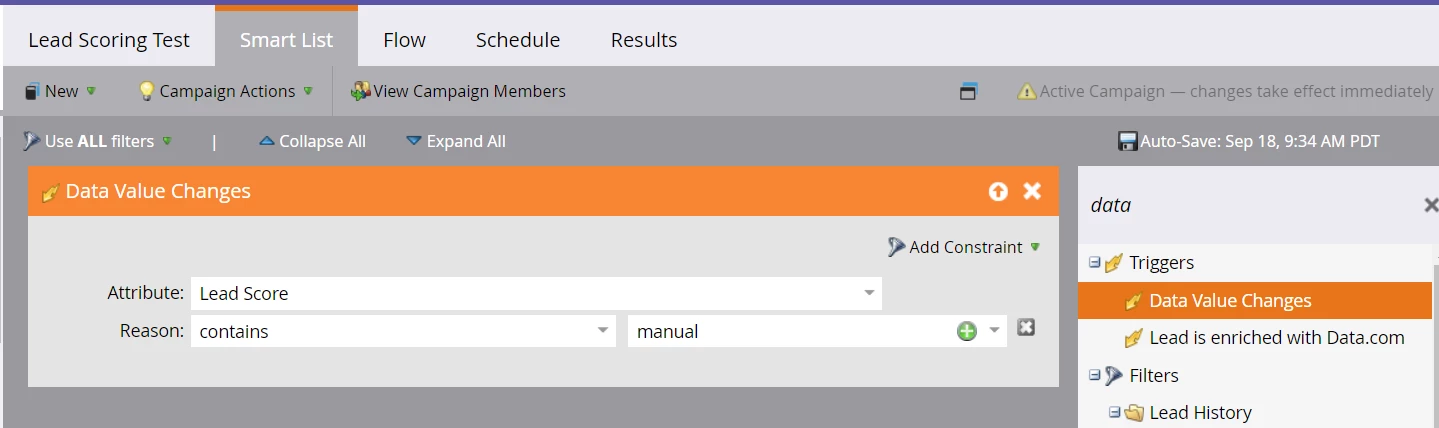

This screen shot shows examples of how you might set this up.
The list below shows a few of the values you may see in the Reason field. If you know the exact phrase you are looking for, use the "is" operator. For example, "Changed by Smart Campaign Contact Us." If you don't know the exact value, try using the operator "starts with" or "contains."
- Synched from salesforce.com
- Changed by Smart Campaign
- System flow action
- System action reset
- Form fill-out
- SOAP API
- Manual lead edit
- Munchkin API
- Import/merge into list
The Reason filter constraint is available in these filters:
- Data Value Changed
- Lead Partition Changed
- Progression Status was Changed
- Revenue Stage was Changed
- Not Data Value Changed
- Not Lead Partition Changed
- Not Progression Status was Changed
- Not Revenue Stage was Changed