
TROUBLESHOOTING—List Import Dialog Box “Stuck” on Step 2
When doing a list import, sometimes the dialog box won’t advance past the Step 2 section where columns are mapped to Marketo fields.
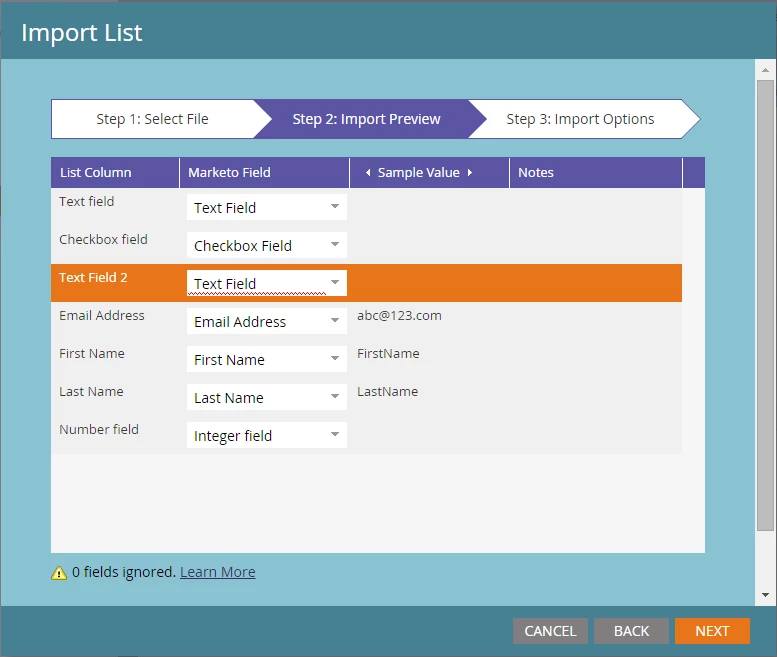
If you look closely, you’ll see that there is a Marketo Field selected that has a red squiggly underline underneath it. If any of the fields have this, you won’t be able to click on Next to get to Step 3 and the import dialog box will get “stuck” at this point.
This problem is caused by having two columns in your list mapped to the same one Marketo Field. Two pieces of data can’t be pushed into the same one field, so it stops the import in its tracks at this point until you change it to select a different field. If you mouse-over that field, you’ll get the error that shows that the field is already in use.
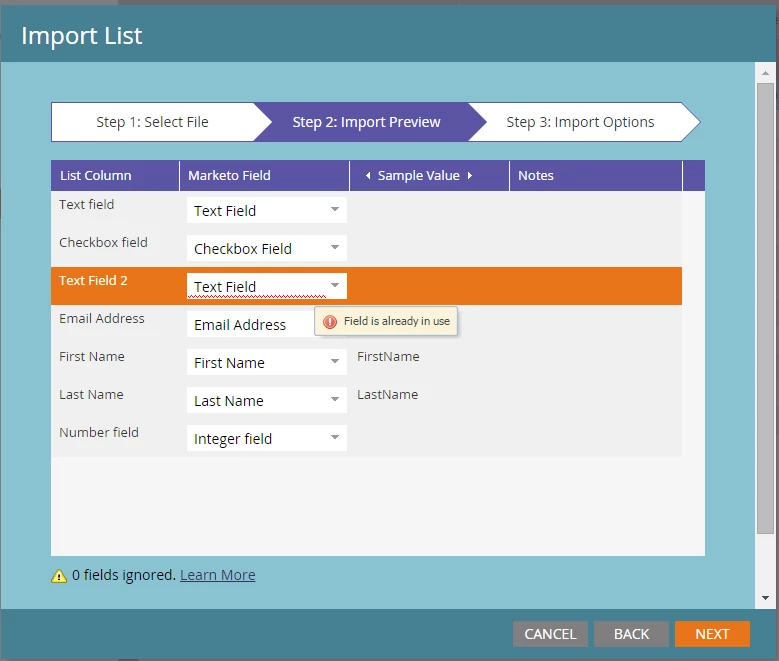
The quickest way to fix this is to simply choose a different Marketo Field to map the list column to. Once there aren’t any more Marketo Fields used twice, the import dialog box will advance to Step 3. Problem solved!