
Marketo Live Chat Support
Included in this article
Overview
Marketo's Live Chat offers a great way to get the help you need. Chat live with Marketo experts and we’ll answer your questions, point you to detailed support resources, or open a support case. Our Live Chat Support feature is a convenient way to connect with us.
Live Chat Availability
Marketo Live Chat is available around the clock during the week on a 24x5 schedule, excluding regional holidays. Access to Live Chat depends on your support level as shown below:
Online | Business | Premier | Elite | |
Support Portal | X | X | X | X |
Live Chat | X | X | X | X |
Phone | X | X | X |

Starting a Live Chat Session
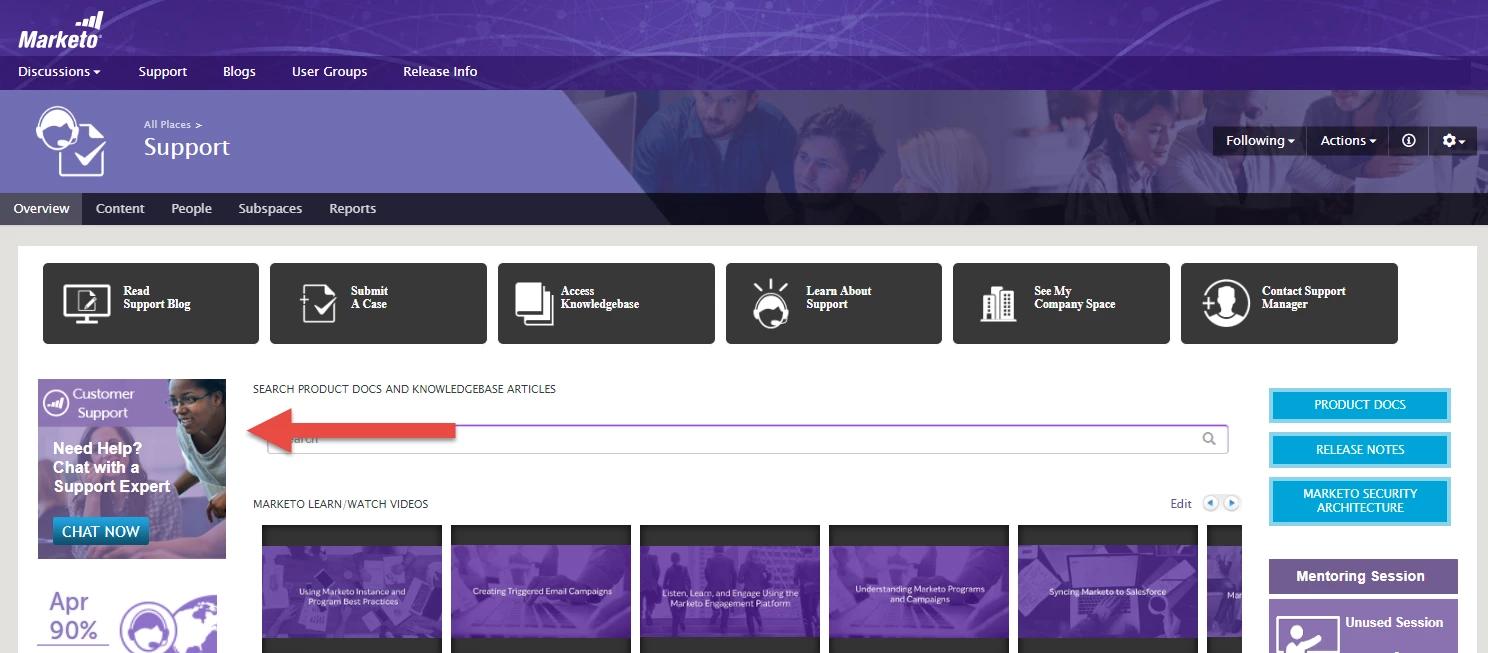
Your Authorized Support Contacts can start a Live Chat session by visiting the Support Portal at support.marketo.com. Locate and click the Live Chat link or button to initiate a chat session. If you do not see this panel in the Support Portal, you may not be an Authorized Support Contact. Please contact your Marketo admin to manage your authorized contacts.

Where to Locate the Live Chat Button
The live chat option will appear on the Support page in the Community and will also show up in the Case Connector when logging a case online.
Support
Additional Questions
Have additional questions about Live Chat or other support features? Please feel free to contact us at marketocares@marketo.comsupport@marketo.com
Want to upgrade your Service level? Please contact your Marketo Account Manager.