
Images that are embedded in the body of the email are not showing in Outlook 2007 / 2010 | Community
Skip to main content
Jamie-Carey
Level 4
December 30, 2014

Images that are embedded in the body of the email are not showing in Outlook 2007 / 2010

  • December 30, 2014
  • 5 replies
  • 3877 views

You or your users may be having problems with images not showing up in the body of an email.

If images are that are embedded in the body of the email are not showing up in recent versions of Microsoft Outlook, then follow these steps:

Outlook 2007

1.       Open Outlook.

2.       Click Tools -> Trust Center (Outlook 2007).

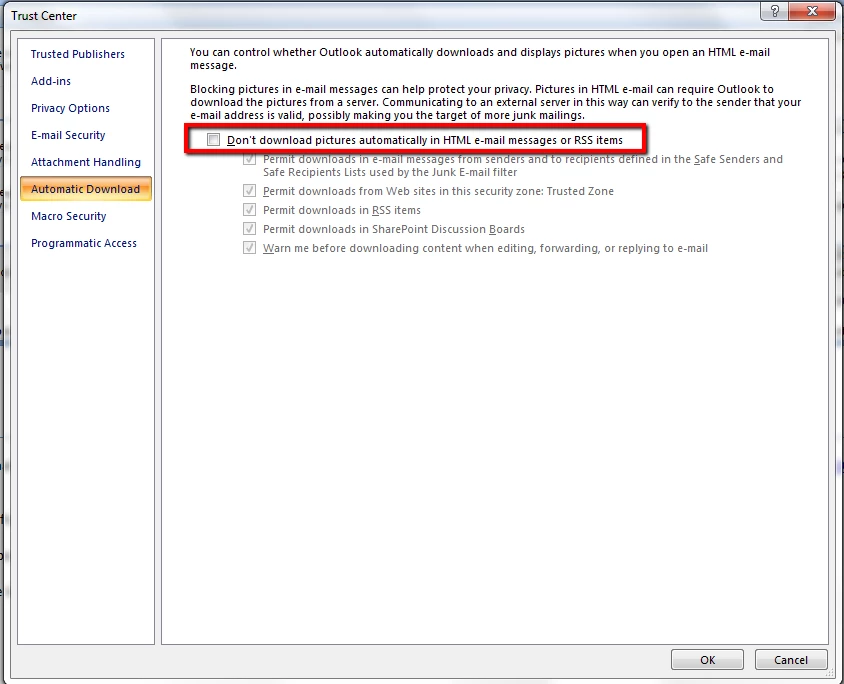
3.       Uncheck the box, ‘Don’t download pictures automatically in HTML e-mail messages or RSS items’.

4.       Click OK; restart Outlook and check that images appear.

Outlook 2010

1.       Open Outlook.

2.       Click File -> Options -> Trust Center (Outlook 2010).

3.       Click ‘Trust Center Settings’.

4.       Uncheck the box, ‘Don’t download pictures automatically in HTML e-mail messages or RSS items’.

5.       Click OK; restart Outlook and check.
This post is no longer active and is closed to new replies. Need help? Start a new post to ask your question.

5 replies

September 2, 2015

This solves the issue on the Marketo user's Outlook, but what about all the people who will be receiving the email in Outlook?  Will we have to tell him to follow these steps in order to see one image in our emails?

September 3, 2015

What do you do when the images show up, but they are hidden behind the email body?  The HTML in my template is showing the image in line with the text, yet you cannot see it in the email.

Is anyone else having this issue?

Jamie-Carey
Level 4
September 3, 2015

There's nothing a sending server can do to manage lead's own settings in their own email client. Hopefully they already have that setup on their end.

Jamie-Carey
Level 4
September 3, 2015

You will probably want to start a discussion in the Discussions area to work on this problem in case others may have had this problem and already solved it. Support may also be able to help you if this is not custom code and you could open a ticket with them.

December 9, 2016

This is happening to me. Did you ever find out what the cause is, and how to fix it?