Identify Leads That Have Reached Their Communication Limit | Community
Skip to main content
KCS_Integration
Level 2
June 20, 2018

Identify Leads That Have Reached Their Communication Limit

  • June 20, 2018
  • 4 replies
  • 5097 views

Issue

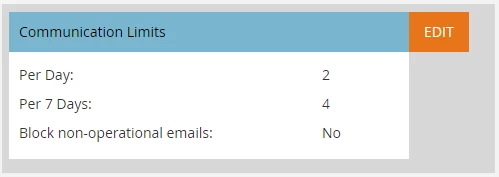
You would like to have a list of leads who will get blocked from receiving emails when you send email via campaign or program due to Communication Limits. Your Communication Limit setup can be found in the Admin Panel and looks something like this.


Solution

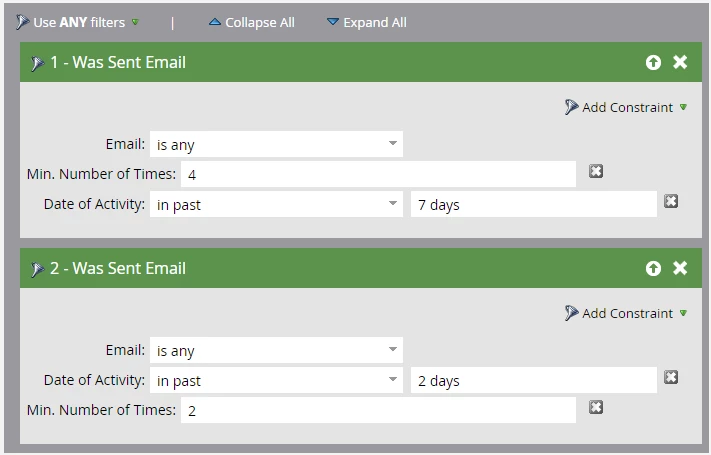
You can create a Smart List with the below setup and this list will show you the list of the people who will hit communication limit when you try to send an email.


To learn more about Communication Limits and how they work, you can review this article.


This post is no longer active and is closed to new replies. Need help? Start a new post to ask your question.

4 replies

Level 1
September 10, 2018

Shouldnt this be Delivered Email ?

Roxann_McGlump1
Level 5
September 10, 2018

No.  Communication Limits are based on emails sent, not emails delivered.

Ryland_Branam3
October 30, 2018

Thank you Roxann, I have been helping my team try to avoid hitting communication limits. This is a great way to check and see if the qualified audience will hit comm limits. I used it and it worked.

Colin_Ryder
Level 4
March 12, 2019

Just a thought on this as I recently stumbled across it the post.

The smart lists above will also include any operational emails (email is any) so this is not quite correct, and you will see records qualifying for this list who were also sent operational emails too.

Right now there is no way to separate this out. I have created an idea here to get this as an option on the schedule tab (please vote up).

There's also some older posts that talk about how to get around this and using additional smart lists / campaigns to catch folk who qualified but were not sent the email.

How Do Communication Limits Work?

Communication Limits Notifications