How to Repair Marketo Sales Insight Setup & Configuration Problems
If you tried to Verify the Setup and Configuration of Marketo Sales Insight via the Sales Insight tab in the Admin section of Marketo Lead Management, and the MSI Status wasConfiguration Problem, a configuration error in your Marketo Sales Insight setup was detected, meaning that one or more of the required fields/objects for synchronization were not properly configured in Salesforce.
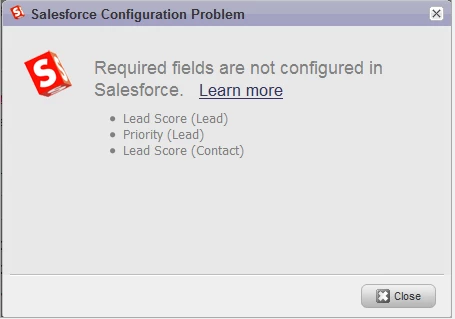
Click the Configuration Problem link to launch the Salesforce Configuration Problem dialog box, which displays the detected errors.
Sample Error Dialog Box:
The system verifies the configuration of the following eight check points in Salesforce:
- Lead Score Field (Lead)
- Lead Score Field (Contact)
- Relative Score Field (Lead)
- Relative Score Field (Contact)
- Relative Urgency Field (Lead)
- Relative Urgency Field (Contact)
- Priority Score Field (Lead)
- Priority Score Field (Contact)
The error message displays the fields/objects that are causing errors during sync between Marketo and Salesforce. The goal of this article is to repair these configuration problems and ensure that the proper permissions are set to read and write to these fields/objects during sync. Refer to one of the sections below to repair these errors in Salesforce Professional Edition or in Salesforce Enterprise or Unlimited Edition.
How to Repair Configuration Problems in Salesforce Professional Edition
To repair configuration problems in Salesforce Professional Edition:
Log in to the Salesforce as an Admin.
Within Salesforce, add the fields noted in the error message to the required Lead and/or Contact layouts to repair the error.
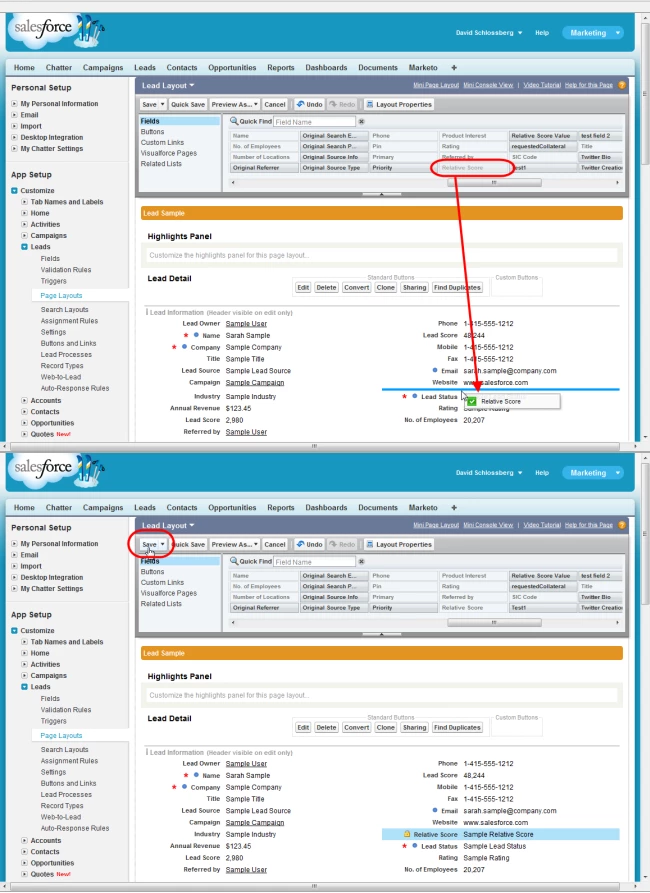
Open the Fields section at the top of the Layout page, then drag in the fields/
Once the fields are in place, click Save at the top of the layout page.
Note
The MSI Status on the Sales Insight tab will update to verify the config is valid after the next bi-directional sync. Marketo recommends that you check the Sales Insight tab to confirm the repair and that the MSI Status changed to Configured.
How to Repair Configuration Problems in Salesforce Enterprise or Unlimited Edition
To repair configuration problems in Salesforce Enterprise or Unlimited Edition:
- Ensure that the Salesforce user account that is used for Marketo sync has the proper permissions to read and write to the fields noted in the error message.
Note
The MSI Status on the Sales Insight tab will update to verify the config is valid after the next bi-directional sync. Marketo recommends that you check the Sales Insight tab to confirm the repair and that the MSI Status changed to Configured.