How Much Storage is Required to Extract My Entire Marketo Engage Database?
Summary
Estimating the external storage requirements for your Marketo Engage Database
Issue
I want to extract all of my data from Marketo Engage and store it. How much storage space will I need?
Environment
Marketo Engage and External Systems
Solution
Summary
There is no repeatable method to accurately estimate the amount of storage you will need to extract and store your Marketo Engage database. Standing in the way of good estimation is data availability, field selection, and storage method. Any accurate estimate will take into account the potential sizes of each type of data and their quantities (known to data scientists as "facts and dimensions"). Determining ranges for these values takes a lot of preparation and may require a high level of skill.IMPORTANT NOTE: Estimating Database size is hard so any estimate used to make business decisions should be made in cooperation with a database or application architect or other qualified professional.
Scope
Some information won't be extracted. Information about anonymous leads, for example, cannot be extracted. Some of the data that can be extracted may not be needed at all. Selecting the right data for your needs is the best practice as it reduces the required storage and leads to a more efficient extraction process.Field Definitions
How the fields are defined in the target system will affect how big the stored data is. Depending on your storage format, padding may play a role in the size of your extracted database. As an example, the "Country" field in Marketo is a string of up to 255 characters. You could chose to store 255 characters for every country value. Or you may choose a format that uses a variable amount of space. You might also know that the longest country name is "the United Kingdom of Great Britain and Northern Ireland" meaning that 199 of those characters will always be extra so you truncate the value from Marketo storing the first 56 characters only. Each choice will have an impact on the size of your extracted database. Estimating 199 unnecessary characters per lead and making similar decisions for other fields will add up to increased storage requirements and slower extraction time.Format
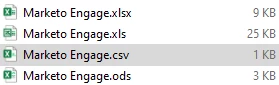
Once the desired data is identified, the next step is to extract, transform and load (ETL) the data from Marketo Engage into your storage system. The data returned by Marketo's API is plain old text which is usually formatted as JSON or CSV. For the information to be useful, you will transform it from JSON into the format necessary for your storage system. That format could be an Excel spreadsheet, Microsoft SQL database or a schema-agnostic database like Azure Cosmos DB. How the data is formatted and encoded will make a big difference in the amount of storage needed. Take this simple example: a Microsoft Excel spreadsheet with "Marketo Engage" in cell A1. I saved that same file in four different formats which resulted in files ranging from 1 KB to 25 KB. The format you store you information in may have a bigger impact on your final storage requirement than the data itself.