
FORMS 1.0 - Add Instructions on a Form Field | Community
Skip to main content
Jamie-Carey
Level 4
December 30, 2014

FORMS 1.0 - Add Instructions on a Form Field

  • December 30, 2014
  • 7 replies
  • 2113 views

You can add a tool tip or instruction to a field on your Marketo form so that users have more information about what you are asking them to input.

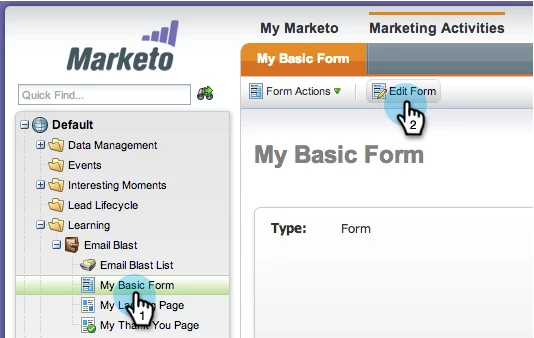
1. Select a form and click on Edit Form.
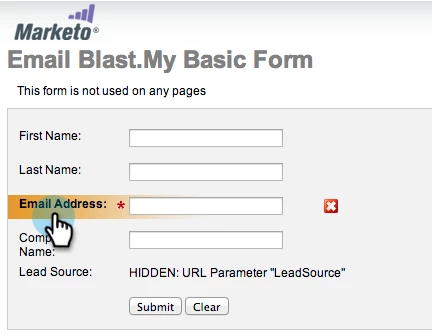
2. Select the field you want to add an instruction to.
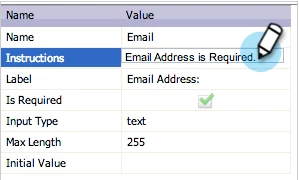
3. Under Form Properties, Field Specific, enter the Instructions.
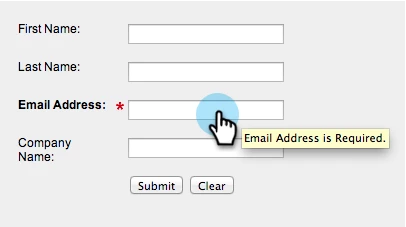
Awesome work! Now when a lead hovers the cursor over the form field, the tool tip or instructions will be displayed.
Make sure to approve the landing page that this form is on so the changes are live.
This post is no longer active and is closed to new replies. Need help? Start a new post to ask your question.

7 replies

September 16, 2015

Is this possible in forms 2.0?

Jamie-Carey
Level 4
September 16, 2015

You can use "hint text" in Forms 2.0.

Level 2
February 2, 2019

Can you add this to a checkbox select field?

SanfordWhiteman
Level 10
February 2, 2019

Jana, are you really still using Forms 1.0?

Level 2
February 4, 2019

We are. This was the first helpful post I could find. We are trying to use the hover (Instruction field) text for check box fields. Do you know if that is possible? When testng it, it does not show the instructions when hovering over the check box text.

SanfordWhiteman
Level 10
February 4, 2019

It is possible; you have to use a bit of JS. If you post a thread to Products​ and link back here I'll answer it there.

Anthony_Baldman
Level 2
February 4, 2019

@Sanford Whiteman​ Hi Sanford. I work with Jana.  We are actually on Forms 2.0. When we put in the hint text for the checkbox, it doesn't work.