Level 2
Sep 27, 2022 8:49 PM UTC
Question

Webhook to Monday.com

Error Message:

Choice Number: 3896
Pay Load: { “query”: “mutation ($boardId: Int!, $companyName: String!, $columnVals: JSON! ) {create_item (board_id: $boardId, item_name: $companyName, column_values: $columnVals) {id}}”, “variables”: {“boardId”:2364371628, “companyName”:““test23LastOne””, “columnVals”: “{“phone”:”“7169084086"”,“text”:““test23LastOne””, “text4”:““test23LastOne””, “long_text”:““test23LastOne””, “status4”:“Website Form”,“email”:{“text":""test23LastOne@test.com” “,“email”:""test23LastOne@test.com” “}}”} }
Url: https://api.monday.com/v2
Webhook Id: 10
Webhook Name: MarketoToMonday
Request Type: http_post
Step ID: 3630
Source: Marketo Flow Action
Response: {“errors”:[{“message”:“No query string was present”}],“account_id”:6562763}
Person ID: 3238884
Response Code: 200


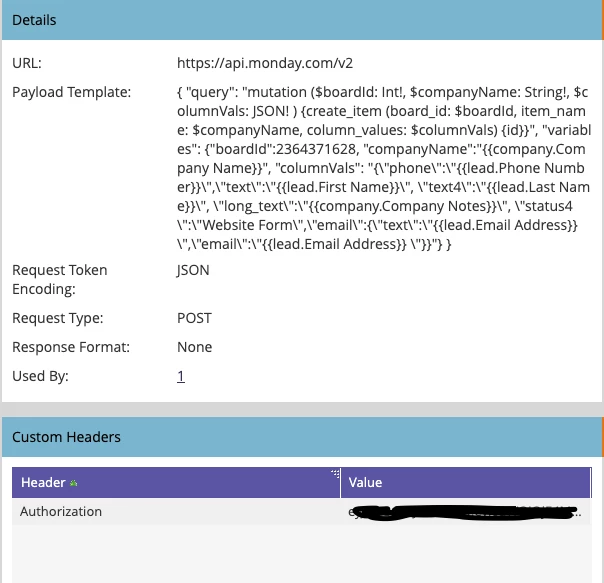
Here is my code:

{ "query": "mutation ($boardId: Int!, $companyName: String!, $columnVals: JSON! ) {create_item (board_id: $boardId, item_name: $companyName, column_values: $columnVals) {id}}", "variables": {"boardId":2364371628, "companyName":"{{company.Company Name}}", "columnVals": "{\"phone\":\"{{lead.Phone Number}}\",\"text\":\"{{lead.First Name}}\", \"text4\":\"{{lead.Last Name}}\", \"long_text\":\"{{company.Company Notes}}\", \"status4\":\"Website Form\",\"email\":{\"text\":\"{{lead.Email Address}} \",\"email\":\"{{lead.Email Address}} \"}}"} }


Here is the Marketo Configuration:
This post is no longer active and is closed to new replies. Need help? Start a new post to ask your question.

3 replies

SanfordWhiteman
User Group Leader
User Group Leader
Sep 27, 2022 9:08 PM UTC


First, that’s an error passed back by Monday.com. It’s not a Marketo error.


If you look at the Call Webhook activity, the assembled payload that was actually put on the wire is not valid JSON. This is because you’re not properly escaping the values.


Moreover, in the data you pasted, you have curly quotes in the payload, which would never work (JSON uses standard dquot).


“query”: “mutat

Translate
Level 2
Sep 28, 2022 3:26 PM UTC

What values do I need to be escaping? Here is the payload template:

{ "query": "mutation ($boardId: Int!, $group_id: String!, $item_name: String!, $columnVals: JSON! ) {create_item (board_id: $boardId, group_id: $group_id, item_name: $item_name, column_values: $columnVals) {id}}", "variables": {"boardId":2364371628, "group_id": "New Leads", "item_name":\"{{company.Company Name}}\", "columnVals": "{\"phone\":{{lead.Phone Number}},\"text\":\"{{lead.First Name}}\", \"text4\":\"{{lead.Last Name}}\", \"long_text\":\"{{company.Company Notes}}\", \"status4\":\"Website Form\",\"email\":{\"text\":\"{{lead.Email Address}}\",\"email\":\"{{lead.Email Address}}\"}}"} }


Here is the payload being sent to Monday:

Pay Load: { "query": "mutation ($boardId: Int!, $group_id: String!, $item_name: String!, $columnVals: JSON! ) {create_item (board_id: $boardId, group_id: $group_id, item_name: $item_name, column_values: $columnVals) {id}}", "variables": {"boardId":2364371628, "group_id": "New Leads", "item_name":"testAddGroupID", "columnVals": "{"phone":7169084086,"text":"testAddGroupID", "text4":"testAddGroupID", "long_text":"testAddGroupID", "status4":"Website Form","email":{"text":"testAddGroupID@test.com","email":"testAddGroupID@test.com"}}"} }


I am not sure I understand what you mean by curly quotes --->" this is the only quote I know on the keyboard located left of enter button should I do two single quotes --->'' ?  

Translate
SanfordWhiteman
User Group Leader
User Group Leader
Sep 28, 2022 7:31 PM UTC

You’re trying to embed serialized JSON within JSON. But the whole payload needs to be valid.


This isn’t valid JSON:

{ "query": "variables": {"email":"testAddGroupID@test.com"}}"} }


Nor is this valid:

{ "query" : ""variables"": {""email"":""testAddGroupID@test.com""}}" }


While this is:

{ "query" : "\"variables\": {\"email\":\"testAddGroupID@test.com\"}}" }


I am not sure I understand what you mean by curly quotes --->" this is the only quote I know on the keyboard located left of enter button should I do two single quotes --->'' ?  


You pasted content above, supposedly from the payload, that has curly quotes “ ”.

Translate