'Unique Clicks' and 'Opened' Total Count in Advance BI Analytics Tool
The email report we built in Advanced BI Analytics includes Sent, Delivered, Opened, Unique Clicks, and Unsubscribed, along with their percentage metrics.
In our report, the totals for Opened and Unique Clicks count distinct people across all included emails. They do not add up the counts shown for each email. A person who opens or clicks multiple emails is counted only once in the overall total.
For example:
-
Email 1: Leads A, B, C, and D click, giving 4 unique clicks.
-
Email 2: Leads C, D, E, and F click, giving 4 unique clicks.
-
The sum of the individual email counts is 8.
-
The report total shows 6 because Leads C and D are counted only once across both emails.
This makes the total difficult to reconcile with the individual email rows. When Sent and engagement totals use different counting methods, the overall Opened and Clicked percentages can also be misleading.
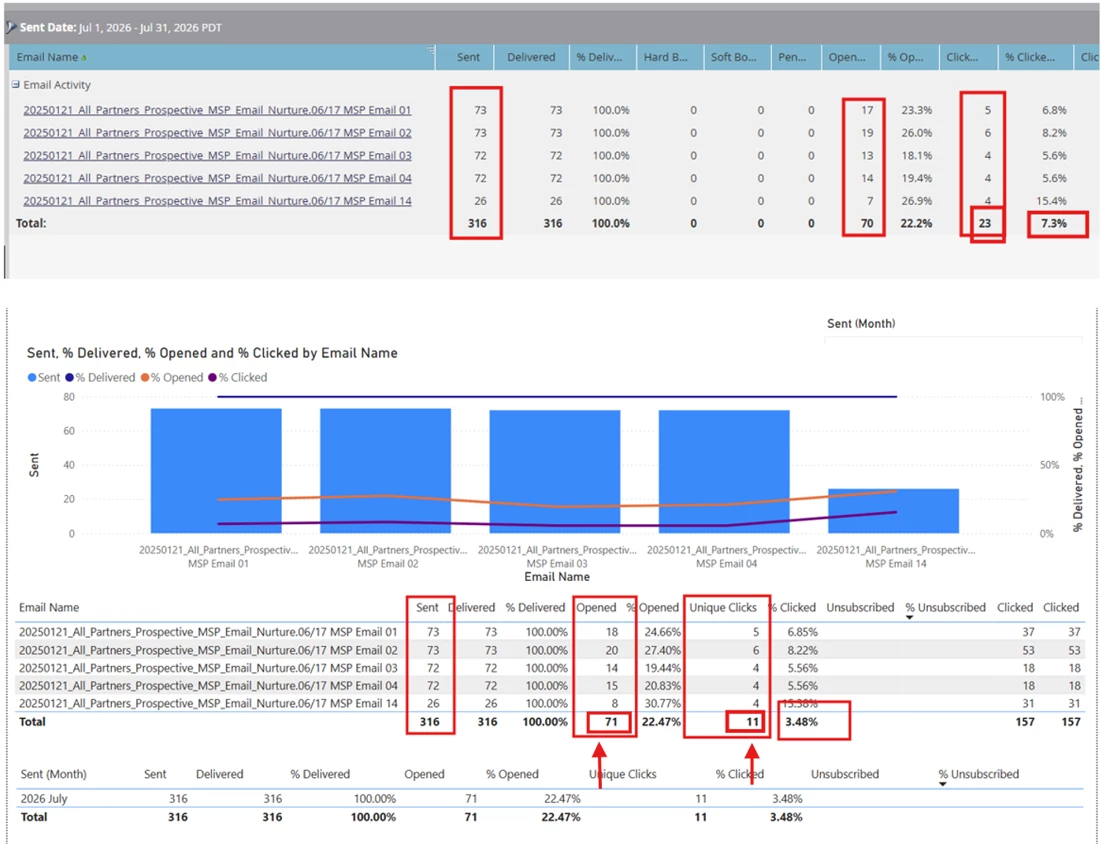
Proposed idea:
We would like Advanced BI Analytics to offer the same approach as the Marketo Email Performance Report (see attached screenshot), where Total Sent, Total Opened, and Total Clicks reflect the sum of the individual email counts.
With this approach:
-
Each email would retain its unique person counts for opens and clicks.
-
The total row would sum the individual email counts. In the example above, Total Unique Clicks would show 8.
-
Overall percentage metrics would use these summed totals to keep the counting method consistent.
This would help users reconcile totals, compare results across reports, and assess overall email performance.