
Ellie_Boardman-
Level 4
February 21, 2017
Solved

Unable to select advanced filters

  • February 21, 2017
  • 5 replies
  • 5243 views

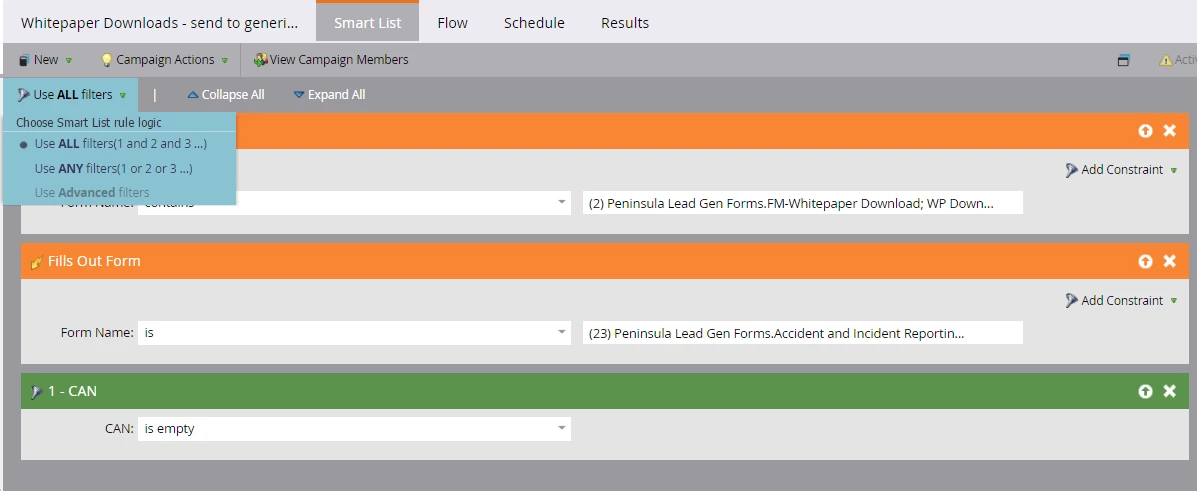
Sure it's something simple I'm missing but any idea why I'm unable to select 'advanced filters' for the below smart list?

I want the filters to be:

<'fills out form contains xxxx' or 'fills out form is xxxx'> AND CAN is empty

The 'advanced filters' option is greyed out as if the set-up is wrong...
This post is no longer active and is closed to new replies. Need help? Start a new post to ask your question.
Best answer by Adele_Miller

Hi Ellie

That is because your first 2 items are triggers - this means the smart campaign will run only when that action has been taken.

Triggers cannot be filtered as they will run exclusively of each other - so in this example the campaign will run if the form filled out contains the top 2 names OR fills out on of the 23 forms you have listed.

The only filter is the CAN one, which is why it has a '1' at the start.


Does that make sense? Hope it helps!

Thanks
Adele

5 replies

Adele_Miller
User Group Leader
Adele_MillerUser Group LeaderAccepted solution
User Group Leader
February 21, 2017

Hi Ellie

That is because your first 2 items are triggers - this means the smart campaign will run only when that action has been taken.

Triggers cannot be filtered as they will run exclusively of each other - so in this example the campaign will run if the form filled out contains the top 2 names OR fills out on of the 23 forms you have listed.

The only filter is the CAN one, which is why it has a '1' at the start.


Does that make sense? Hope it helps!

Thanks
Adele

Ellie_Boardman-
Level 4
February 21, 2017

Hi Adele,  thanks for your quick response! That makes sense - is there a way round this so I can apply the CAN filter somehow?

Adele_Miller
User Group Leader
User Group Leader
February 21, 2017

Hi Ellie the CAN filter will be applied to both of these triggers already based on your picture so everything is perfect!


Thanks
Adele

Daniela_Bachman
Level 2
April 8, 2019

Hi, I am currently creating a smart list (no triggers) and I am unable to select "Advance filters." See Screenshot!

***UPDATED***

For those who are new to marketo, IF you have three or more filters, then you are able to use Advanced Filters in a Smart List. I hope this helps!