
Dory_Viscoglio
Level 10
Feb 26, 2016 2:28 PM UTC
Question

Testing dynamic content in emails

We have many emails with dynamic content, and usually I just preview them to ensure their accuracy, but we have a need to send the samples to another team for review. I found a previous thread that mentioned having an additional checkbox in the send sample email that would send all variations of the email, but that isn't an option as far as I can see. What am I missing here? Is this a feature that has been removed?

Testing dynamic emails Cheryl Chavez​ (since you initially answered the question back in 2013)
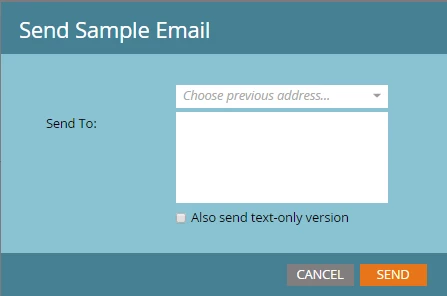
Hopefully this is a quick thing that I'm just missing somehow!

This post is no longer active and is closed to new replies. Need help? Start a new post to ask your question.

17 replies

Feb 26, 2016 2:48 PM UTC

I have looked everywhere and can't seem to find it.

Translate
Robb_Barrett
Level 10
Feb 26, 2016 2:49 PM UTC

You should also see options to send it as someone else, or send it with a trigger.

Very curious.

Translate
Robb Barrett
Robb_Barrett
Level 10
Feb 26, 2016 2:52 PM UTC

Translate
Robb Barrett
Dory_Viscoglio
Level 10
Feb 26, 2016 2:55 PM UTC

Robb, this is from the preview screen, not the edit screen, which could account for the option to send to a specific lead being missing. I do see it in other places.

But, there is no way that for every segment I have, I should know an email address off the top of my head of someone who qualifies for that segment. And I would have to manually send every sample individually. That's all sorts of crazy-talk

Translate
Robb_Barrett
Level 10
Feb 26, 2016 7:02 PM UTC

This is why I just create separate emails.

Translate
Robb Barrett
Feb 26, 2016 7:44 PM UTC

HI Dory,

You can do this in the preview mode. However, you will still need to send the sample emails one by one. So- if you have 4 segments and what to send a sample of all 4, you will have to do it 4 times.

Good news is that you don't need to know which lead belongs to which segment.

First, change it to view by segment in preview.

Then, select the segment.

And last, send sample.

Translate
Cyndi_Marty
Level 2
Feb 26, 2016 9:05 PM UTC

Hi, we have several segments/dynamic content and took the time to set up a test email list. This has saved us from sending each email individually each time. A trick I learned recently was to add a variable to a gmail account which allows you to test different emails but they will all arrive in your gmail account which makes this process a lot easier.

For example: Email.sample@gmail.com

The test variant you can add would be: Email.sample+1@gmail.com

The +1 can be +2, +3, +4 etc. Our testing now take only a few minutes to send instead of the 30+ mins like it used to.

Good luck!

Translate
Dory_Viscoglio
Level 10
Feb 27, 2016 1:23 AM UTC

All good workarounds, except they aren't really a solution in my opinion --- especially when according to Cheryl Chavez​ this used to be a feature! Off to idea-land to come up with a new suggestion.

Translate
Dan_Stevens_
Level 10
Feb 27, 2016 5:04 PM UTC

Hi Dory - actually, this works in our instance.  First, you need to make sure the email is using segmented/dynamic content.  Then while in the editor, select "preview email" on the right. Under "Preview Actions", select "send sample".  You should now see this:

Unfortunately, like other select modal windows like this in Marketo, the additional options are buried further down and not viewable.  When you scroll down, you should see this:

It's examples like this that I actually miss the older interface - where more information is viewable in a standard modal window.

Translate
Feb 27, 2016 6:22 PM UTC

The feature has not been removed, you have to scroll to the bottom of the screen to find it.  We will fix the height of the modal so that it isn't hidden.  We will send up to 100 variations of the dynamic email as a sample.

Translate
Dory_Viscoglio
Level 10
Feb 29, 2016 1:01 PM UTC

Thanks for the reply, Dan and Cheryl! I hope that Cheryl's team can fix the size of the modal, because no matter how I get to the send sample (went the exact way you mentioned, Dan), I don't have any scroll bars. Thanks!

Translate
Feb 29, 2016 3:16 PM UTC

Dory,

Try this:

1. Build a list with some leads that will qualify for your segments to test the dynamic content.

2. Build the email with dynamic content. Head over to preview and click on "Select List", now select the "list" with the leads.

3. Once you select the list you will see the scroll bar show up.

   and the "Send variations from lead list" check box.

I hope that worked

Translate
Oz_Platero
Level 6
Sep 1, 2016 7:54 PM UTC

Hello Dory,

You will need to

- Navigate to the preview version of that email

- In the "View by" select "List"

- Next to List select an actual list

- It will take about a second or two to update

- You should now see that extra option at the bottom when you send a sample

Thank you,

oz

Translate
Sujatha_Vutla
Level 4
Jun 9, 2017 7:00 AM UTC

Thanks to one and all. I too had same doubt. But with all your suggestions I tried again now I am cleared.

Translate
Oct 25, 2017 2:16 AM UTC

Thanks everyone for helping as I had the same question

Translate