September 20, 2016
解決済み

Subscription Preferences Form

  • September 20, 2016
  • 2 の返信
  • 2208 ビュー

Hi! I have a few subscription preferences form questions. When I visit Marketo's subscription preferences page for reference, there are a few things that they do that I'm looking to replicate:

  1. The email address is not editable, meaning I cannot update it. When I created my form, that wasn't an option. How do I enable that?
  2. When I want to suspend my email for 90 days, it freezes (or doesn't make any of the email types editable). How do I enable that? Also, I want to more options (i.e. 15 days, 30 days and 90 days). How do I make it the same for all 3 and is there also a way to make it so that if you click one, you cannot click the others (i.e. I click "pause for 15 days" I cannot also click "pause for 30 days")?
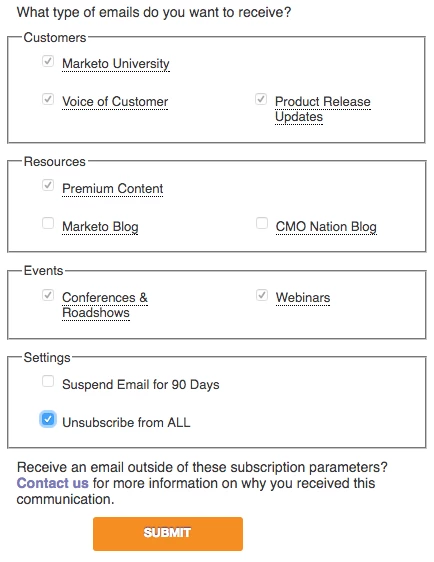
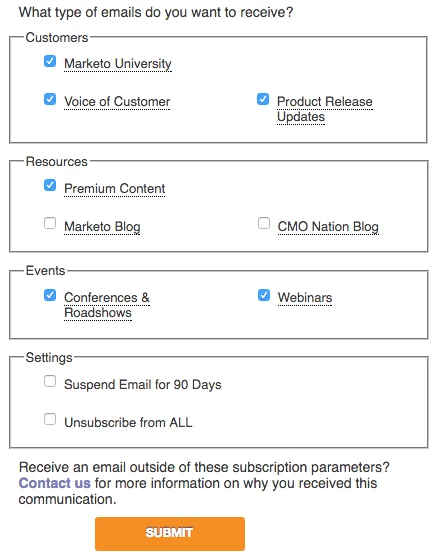
  3. Same for "Unsubscribe from all" button, if I click that, how do I freeze (or gray out and make every other button uneditable)? Check out the images for reference.

Thanks for your help!

​

Other options grayed outNot grayed out
このトピックへの返信は締め切られました。
ベストアンサー Josh_Hill13

Steve,

Most of the functions you want require custom javascript. Please hire a developer to do that.

  • non editable email - I personally hate this and there are threads here that denounce that. Instead, use the Not You? option to give the lead an option to go to a non prefill page+form.
  • Suspend 90 days - this requires extra fields or picklists and a workflow in Marketo. I've found that this is often challenging to pull off without some thought into wait steps and Suspended.
  • Unsubscribe All+gray out - custom dev, but honestly not really a big need. They unsubscribe, then your workflows will opt out on the other fields.

Please do a search here for lots of material on how to do this. I also have 3 articles on my site marketingrockstarguides.com.

2 の返信

Josh_Hill13
Level 10
September 20, 2016

Steve,

Most of the functions you want require custom javascript. Please hire a developer to do that.

  • non editable email - I personally hate this and there are threads here that denounce that. Instead, use the Not You? option to give the lead an option to go to a non prefill page+form.
  • Suspend 90 days - this requires extra fields or picklists and a workflow in Marketo. I've found that this is often challenging to pull off without some thought into wait steps and Suspended.
  • Unsubscribe All+gray out - custom dev, but honestly not really a big need. They unsubscribe, then your workflows will opt out on the other fields.

Please do a search here for lots of material on how to do this. I also have 3 articles on my site marketingrockstarguides.com.

September 20, 2016

Thank you Josh. I appreciate the quick feedback!