Level 2
Dec 16, 2022 3:36 PM UTC
Solved

Smart campaign expiration/deactivation

Dear Friends,


I'm seeking knowledge on whether there is a way to automatically deactivate or set expiration date to a smart campaign.

For Eg. I want a campaign sending confirmation emails for my gated content to stop running/sending out emails after a year from the date of creation.


Thanks

This post is no longer active and is closed to new replies. Need help? Start a new post to ask your question.
Darshil_Shah1
Darshil_Shah1Accepted solution
Adobe Champion, Community Advisor, UG Leader
Dec 16, 2022 3:59 PM UTC

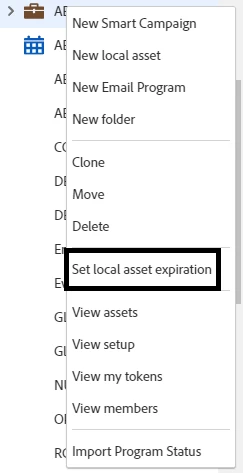
Yes, you can set an expiration date for the assets (including local smart campaigns) within a program. You can right-click on the program > select the "Set local asset expiration" option > Select the active trigger SC(s) that you'd like to set an expiration for in the dialog and then set the expiration date and time.

Check out this experience league documentation that has a step-by-step guide for the same.


2 replies

Darshil_Shah1
Adobe Champion, Community Advisor, UG Leader
Darshil_Shah1Adobe Champion, Community Advisor, UG LeaderAccepted solution
Adobe Champion, Community Advisor, UG Leader
Dec 16, 2022 3:59 PM UTC

Yes, you can set an expiration date for the assets (including local smart campaigns) within a program. You can right-click on the program > select the "Set local asset expiration" option > Select the active trigger SC(s) that you'd like to set an expiration for in the dialog and then set the expiration date and time.

Check out this experience league documentation that has a step-by-step guide for the same.


Translate
SatnamSi2Author
Level 2
Dec 16, 2022 4:28 PM UTC

Thanks @darshil_shah1 this helps.

Translate