Question
Select Country field text not showing on form
I have styled our form so that the field labels show up in the text boxes. (I did this by omitting the text in the form label field and styling the text in the "hint" field).
All of the other fields show up fine except unfortunately, the "Select Country" instruction text field shows up blank in in Chrome and IE. I think this might be because the "select country" option does not offer the "hint text" only the "instructions" field. Does anyone know the class selector to style the "instructions" field?
To test my theory I deleted all custom css and made sure I was on the "plain css" template option and the "select country field" still was not showing.
Below is a screenshot to see how it looks in Chrome:
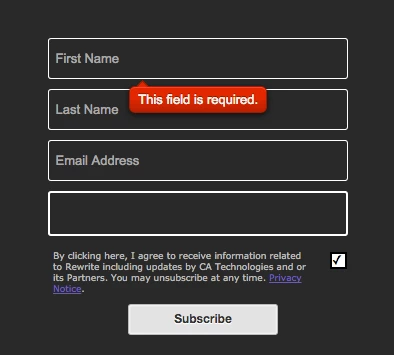
All of the other fields show up fine except unfortunately, the "Select Country" instruction text field shows up blank in in Chrome and IE. I think this might be because the "select country" option does not offer the "hint text" only the "instructions" field. Does anyone know the class selector to style the "instructions" field?
To test my theory I deleted all custom css and made sure I was on the "plain css" template option and the "select country field" still was not showing.
Below is a screenshot to see how it looks in Chrome: