April 15, 2015
已解决

RTP dashboard in Google Analytics how to compare goal completion?

  • April 15, 2015
  • 4回复
  • 2399查看
Hi,

Does anybody have any experience of tweaking the standard RTP dashboard in Google Analytics?

I'd like to have a comparison of 'Goal 1 completion' for people who have been exposed to an RTP ad, against those who have not.

Thanks,
Paul
 
此主题已关闭回复。
最佳答案由
Hi Paul,

I think it will be easier for you to use a custom report to see all the goal completions made by visitors that clicked RTP campaigns.

See this custom report: https://www.google.com/analytics/web/template?uid=2H0ik5rkRxKJQlBdItHEqQ

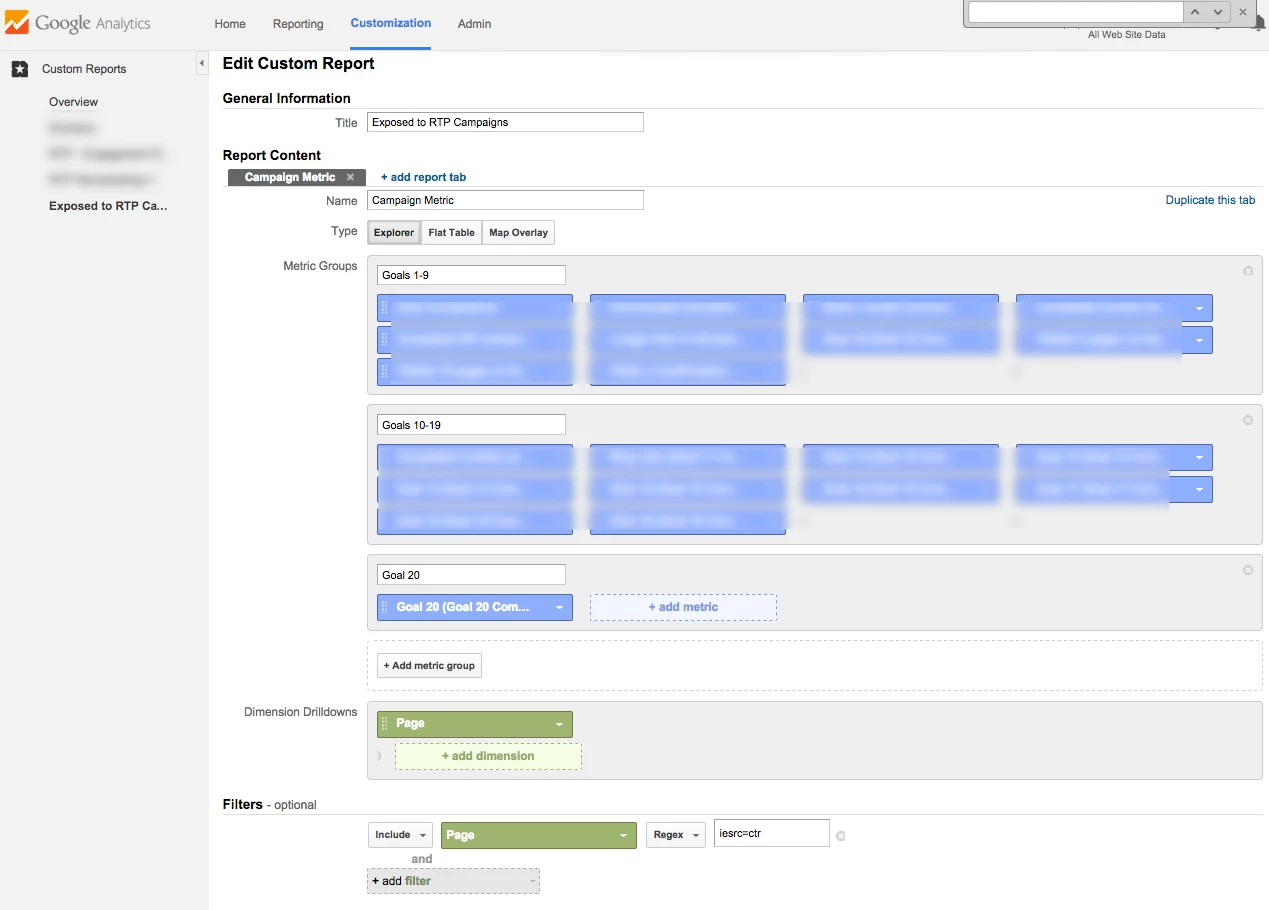
I used a filter Page (Regex) "iesrc=ctr" for this report and by doing that only people that clicked campaigns will be included in the report, see a screenshot below.

Google doesn't allow to have more than 2 metrics in each dashboard widget, so you can only show 2 goal completions columns there - you can click the 'Add to Dashboard' button to quickly do it.

Yanir.

4回复

April 27, 2015
Hi Paul,

I can try to help you customizing the standard RTP dashboard to include goal completions.

Can you please grant a view only user to your Google Analytics account for marketortp@gmail.com?

Thanks,

Yanir
April 29, 2015

That would be great thanks Yanir.

You should just have received an email granting you the relevant access.

It is goal complaetion 1 that I am most interested in (hopefully you can break down by which goal).

Thanks,

Paul


回答
April 29, 2015
Hi Paul,

I think it will be easier for you to use a custom report to see all the goal completions made by visitors that clicked RTP campaigns.

See this custom report: https://www.google.com/analytics/web/template?uid=2H0ik5rkRxKJQlBdItHEqQ

I used a filter Page (Regex) "iesrc=ctr" for this report and by doing that only people that clicked campaigns will be included in the report, see a screenshot below.

Google doesn't allow to have more than 2 metrics in each dashboard widget, so you can only show 2 goal completions columns there - you can click the 'Add to Dashboard' button to quickly do it.

Yanir.

April 29, 2015
That is great. Thank you for your help.
Paul