April 27, 2015
已解决

Quick Email Sends

  • April 27, 2015
  • 2回复
  • 1130查看
Is there a way to quickly select an approved email and send it to an uploaded list, with necessarily creating a new campain? Thanks!
此主题已关闭回复。
最佳答案由 Bruce_Jeffers
Yes, you can do this in the Lead Database area.

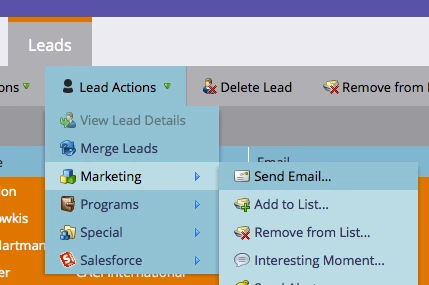
Go into the List or Smart List that you want to send to, and select any (or all) of the Leads that you want to receive the email. Then click on the 'Lead Actions' drop-down --> Marketing --> Send Email.

2回复

Bruce_Jeffers
Level 4
April 27, 2015
Yes, you can do this in the Lead Database area.

Go into the List or Smart List that you want to send to, and select any (or all) of the Leads that you want to receive the email. Then click on the 'Lead Actions' drop-down --> Marketing --> Send Email.

April 28, 2015
Worked perfectly. Thanks for your help!