Level 2
Nov 21, 2023 2:42 PM UTC
Solved

Progressive profiling field display issue

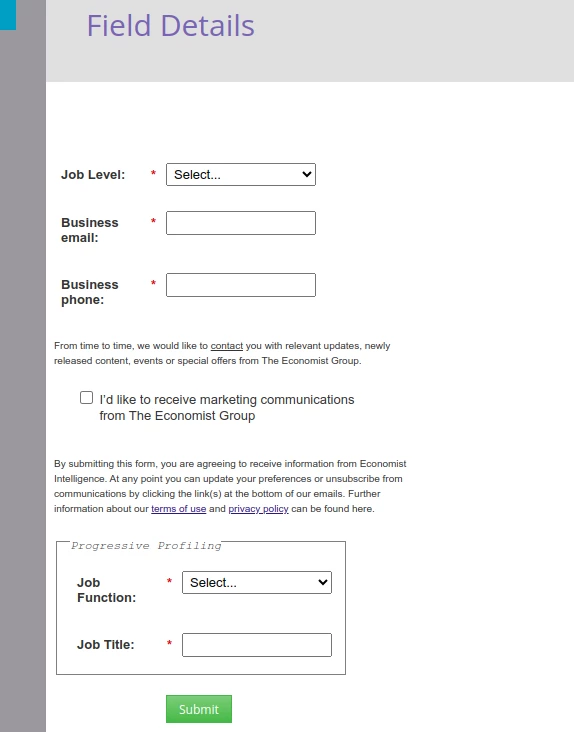
Some time ago, fields for progressive profiling were added to our website.
However, in the Chrome browser, progressive profiling fields are not displayed at all (in the settings it is specified to show one of two). The field appears in the Firefox browser, but it does not have a label. I disabled all custom CSS styles, but this did not affect the display of fields: it is still missing in Chrome and without a label in Firefox.
I didn't find anything similar in the topics.

I'm wondering if there are any known issues with the display of progressive grading fields in general, as well as their operation?
Can this be resolved through the efforts of the site developers or are there other options? Is there a way to put progressive profiling fields along with a group of regular fields? Perhaps this would solve the problem.

SanfordWhiteman
SanfordWhitemanAccepted solution
User Group Leader
Nov 22, 2023 8:05 AM UTC

Ah, I missed the link when reading on my phone earlier.


Your issue is because you’re hiding the <label> element in line 7103 of frontend.css:


.mktoForm .mktoFormRow:nth-last-child(5) .mktoLabel { display: none; }


There are other CSS rules in that same file affecting the form.


It’s generally bad to use :nth-child/:nth-last-child to style forms, as any change to field order — including by Visibility Rules or Progressive Profiling — breaks the layout.

5 replies

SanfordWhiteman
User Group Leader
User Group Leader
Nov 21, 2023 5:23 PM UTC

Please link to your page. There's no other way to troubleshoot your setup. Oops, the link was there. Looking at the page now.

Translate
ahaikoAuthor
Level 2
Nov 22, 2023 7:54 AM UTC

I thought I included the link in the first sentence. I'll duplicate this again: clearstateupst.wpengine.com/progressive-profiling-form-test.

I also noticed that the Progressive profiling field also appears in Chrome, but it is still without a label.

Translate
SanfordWhiteman
User Group Leader
SanfordWhitemanUser Group LeaderAccepted solution
User Group Leader
Nov 22, 2023 8:05 AM UTC

Ah, I missed the link when reading on my phone earlier.


Your issue is because you’re hiding the <label> element in line 7103 of frontend.css:


.mktoForm .mktoFormRow:nth-last-child(5) .mktoLabel { display: none; }


There are other CSS rules in that same file affecting the form.


It’s generally bad to use :nth-child/:nth-last-child to style forms, as any change to field order — including by Visibility Rules or Progressive Profiling — breaks the layout.

Translate