
Dory_Viscoglio
Level 10
February 10, 2016
Répondu

Permissions required to send a sample?

I feel like I'm going crazy here... I have given a role 14 of 14 Marketing Activities permissions (which I didn't want to do), but I still can't send a sample email!! Has anyone else had this problem, and is there a solution? Maybe this is a bug and I need to file a support ticket?
Ce sujet a été fermé aux réponses.
Meilleure réponse par Andy_Varshneya1

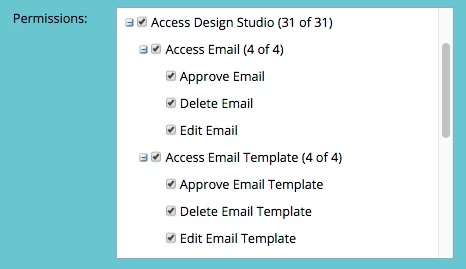
Spit balling here, but have you granted them all email related permissions in the design studio section?

4 commentaires

Grégoire_Miche2
Level 10
February 10, 2016

Hi Dory,

Can't you send it or don't your receive it ?

If you cannot receive it, first clear the usual suspects (SPF, DKIM and white lists). Bur it may also come from your email servers blocking it. I'he seen that is the past : the receiving email server seeing the email sent by you from another email server (Marketo's) just blocks it. If this is so, it means you have to get to your IT and ask them to authorize inbound emails with you as a sender.

-Greg

Andy_Varshneya1
Level 7
February 10, 2016

Spit balling here, but have you granted them all email related permissions in the design studio section?

Dory_Viscoglio
Level 10
February 10, 2016

That's possibly the most ridiculous and confusing exercise I've ever done. Andy, great idea -- it solved the problem. I grazed over that initially because I didn't really want these users to have access to the Design Studio, but that's better than having excess access in Marketing Activities, I guess.

Greg, just so you know I was getting the following error. Adding the Design Studio access solved the problem.

Level 6
December 7, 2017

We found out this week that the user also needs access to the Lead Database in order to not see the permissions issue when sending a sample message. The reason is that you can select a Lead to generate the personalization/dynamic content in the sample message.