Level 1
Dec 19, 2022 8:22 PM UTC
Solved

Open and Click rate performance of a list subset.

I'm trying to see the open and click rates within a subset of the recipients of an email send.


I can see the open and CTR of the full email, but if I want to see the performance of a subset of the audience I'm not finding a way to do so. 


For example, if I send an email to a whole USA audience, but want to just see how it performed with my audience in Virginia, the smartlist function in the email insights doesn't seem to allow for adjustment.


Any help would be appreciated. 

 

This post is no longer active and is closed to new replies. Need help? Start a new post to ask your question.
Darshil_Shah1
Darshil_Shah1Accepted solution
Adobe Champion, Community Advisor, UG Leader
Dec 20, 2022 3:55 AM UTC

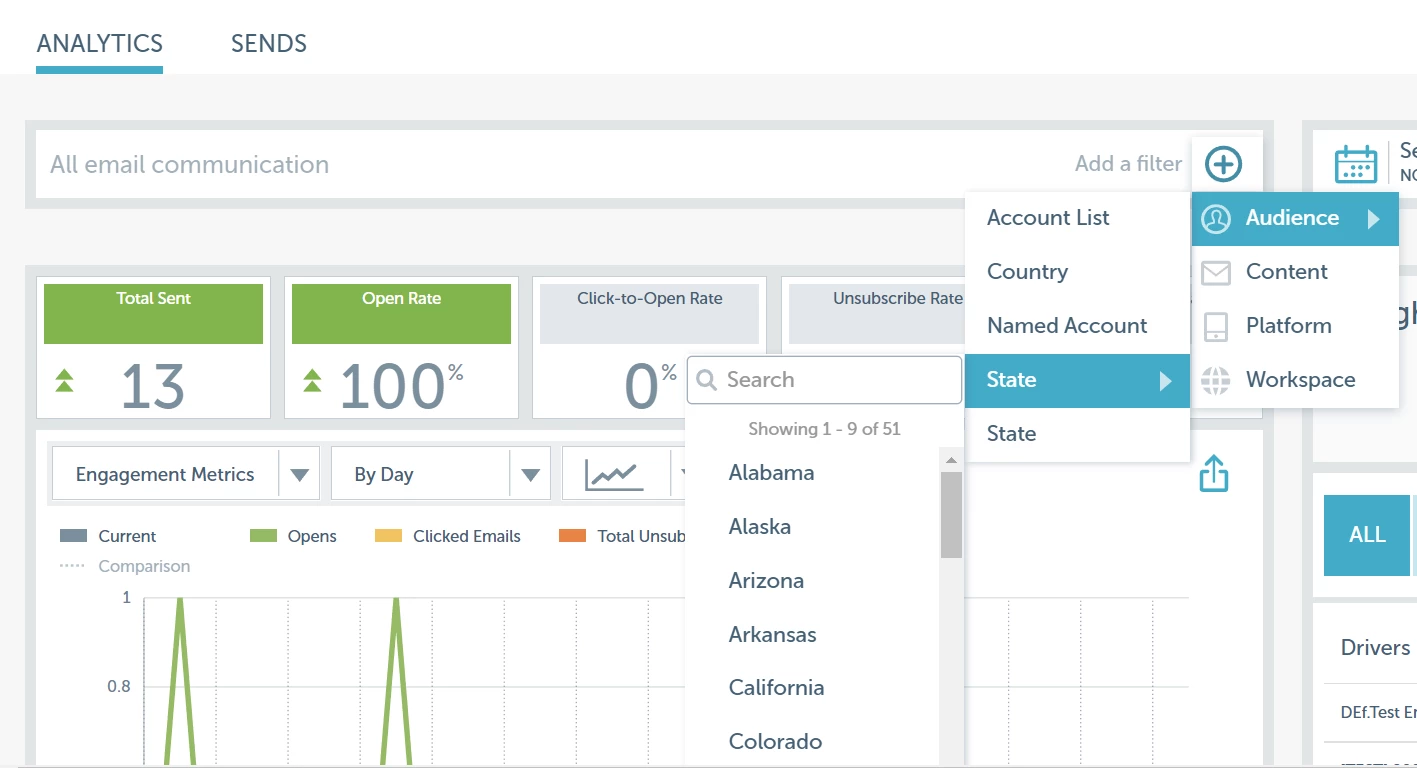
Are you not able to add State filters on the Analytics/Send dashboard? By default, you should see an option for adding the State filter under the Audience filters (see snapshot below). Additionally, you could also add your custom dimensions (including person segmentation or by content type, channel, etc.) by clicking the little gear icon on the top right of the Analytics/Send window if you would like to use additional filters apart from the ones available as OOTB. Hope this helps! Please let us know if you have questions.


1 reply

Darshil_Shah1
Adobe Champion, Community Advisor, UG Leader
Darshil_Shah1Adobe Champion, Community Advisor, UG LeaderAccepted solution
Adobe Champion, Community Advisor, UG Leader
Dec 20, 2022 3:55 AM UTC

Are you not able to add State filters on the Analytics/Send dashboard? By default, you should see an option for adding the State filter under the Audience filters (see snapshot below). Additionally, you could also add your custom dimensions (including person segmentation or by content type, channel, etc.) by clicking the little gear icon on the top right of the Analytics/Send window if you would like to use additional filters apart from the ones available as OOTB. Hope this helps! Please let us know if you have questions.


Translate