March 8, 2016
Frage

Multi-Select Checkboxes

  • March 8, 2016
  • 14 Antworten
  • 5699 Ansichten

Hello friends,

I was wondering if anyone knew of a solution for transforming a multi-select picklist into a multi-select checkbox dropdown (sorry for the mouthful).

So I'd like to move away from this:
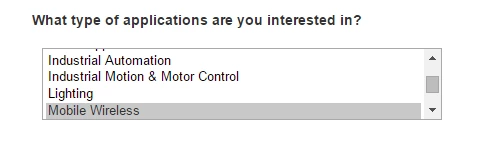
and move toward this:
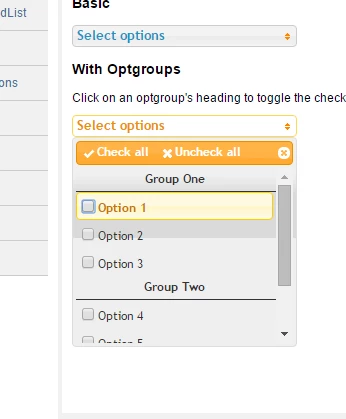
If people were able to select more than one option on their mobile device with the first example then I wouldn't fret over this so much, but I don't think there's a Ctrl or Command click equivalent on mobile.

Any advice would be greatly appreciated. Thanks in advanced!

Dieses Thema wurde für Antworten geschlossen.

14 Antworten

Grégoire_Miche2
Level 10
March 9, 2016

Hi Danny,

have you considered using dependent fields ? It would take 2 fields but might a better answer. Visitor would first select the group, and based on the group selected, the detail checkboxes would appear.

This uses the visibility rules and can be seen here: Dynamically Toggle Visibility of a Form Field - Marketo Docs - Product Docs

-Greg

March 9, 2016

Hey Gregoire,

Yeah, we've thought about doing this, but it wouldn't achieve the functionality we're looking for exactly. I did however find a pretty simple solution.

If you put the checkboxes you want into a fieldset, you can use some custom CSS to put them into a scrolling list.

From the Field Details section in the form editor:

Put this code in the CSS editor:

.mktoFormRow fieldset {

     border:2px solid #ccc; width:400px; height: 150px; overflow-y: scroll; }

Result:

We're still working out some visual kinks, but this would work on the fly if need be.

Grégoire_Miche2
Level 10
March 9, 2016

Nice one.

-Greg