Level 3
Jun 8, 2022 4:25 AM UTC
Solved

Marketo Forms

Hi Team,


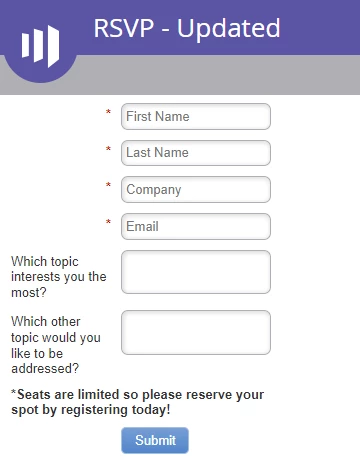
Please help with this, I added two text area fields in the marketo forms.It looks fine in the forms but when inserted in Landing pages it goes missing.


Here is the screen shot - last two text area fields

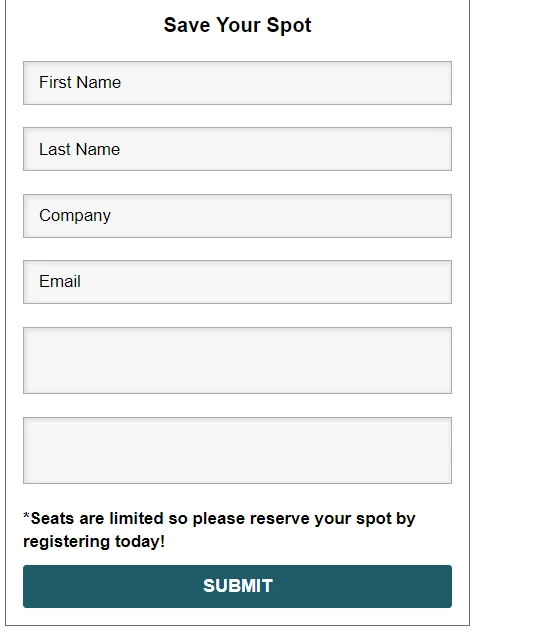
Missing in Landing page


Thanks,

Deepthi.


This post is no longer active and is closed to new replies. Need help? Start a new post to ask your question.
Darshil_Shah1
Darshil_Shah1Accepted solution
Adobe Champion, Community Advisor, UG Leader
Jun 8, 2022 4:57 AM UTC

The last two text fields you see below the email address field on the LP are probably the ones that you've added in the form. I think you'd have added the apt hint text for the other fields in the form (i.e., in the First Name, Last Name, Company, and Email fields), but it probably isn't added for the newer text fields. You'd want to add the hint text (placeholder text) to the new fields, approve the form and the LP and then check the LP. If that doesn't fix the issue, you can share the form editor snapshot and the LP URL, so we can have a look. 
 

4 replies

Nitin_Sharma1-2
Level 2
Jun 8, 2022 4:50 AM UTC

Hi Deepthi,


Please share the URL to check what wrong is happening.


Most probably, you might have not approved the LP after approving the form.

Translate
Thanks,Nitin Sharma
SanfordWhiteman
User Group Leader
User Group Leader
Jun 8, 2022 7:41 AM UTC

Most probably, you might have not approved the LP after approving the form.

Eh, that’s not the most probable explanation. More likely it’s because they hid the labels and didn’t fill in the placeholder like @darshil_shah1 says.

Translate
Nitin_Sharma1-2
Level 2
Jun 13, 2022 4:27 PM UTC

Agree! 

Translate
Thanks,Nitin Sharma
Darshil_Shah1
Adobe Champion, Community Advisor, UG Leader
Darshil_Shah1Adobe Champion, Community Advisor, UG LeaderAccepted solution
Adobe Champion, Community Advisor, UG Leader
Jun 8, 2022 4:57 AM UTC

The last two text fields you see below the email address field on the LP are probably the ones that you've added in the form. I think you'd have added the apt hint text for the other fields in the form (i.e., in the First Name, Last Name, Company, and Email fields), but it probably isn't added for the newer text fields. You'd want to add the hint text (placeholder text) to the new fields, approve the form and the LP and then check the LP. If that doesn't fix the issue, you can share the form editor snapshot and the LP URL, so we can have a look. 
 

Translate
