August 28, 2017
Question

Issue with setting up merge logic

  • August 28, 2017
  • 14 replies
  • 3698 views

Hi all,

   I know there are other threads relating to merging text fields, but I have set up a campaign that I believe works, but isn't working . This is my smart campaign logic:

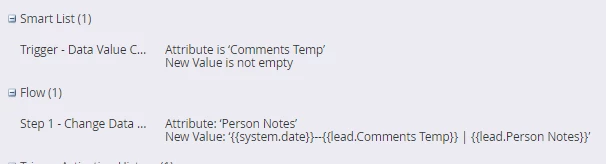
Whenever a text field called "Comments Temp" is changed, then merge whatever is in that "Comments Temp" field with what is in the "Person Notes" field.

I ran another smart campaign to change the value in the "Comments Temp", into "abcdefg". The Comments Temp value has changed, but is NOT activating the smart campaign above and starting the merge logic in the flow step. I also did the same thing with a list import to change the Comments Temp value.

Does anyone know what I'm doing wrong? Thanks in advance

This post is no longer active and is closed to new replies. Need help? Start a new post to ask your question.

14 replies

Josh_Hill13
Level 10
August 28, 2017

Is the campaign set to Run Once or Every time?

August 29, 2017

I just switched it to every time, the data value for the Comments Temp field is changing, but the smart campaign above is not recognizing that I changed that data value

Any other clues? Thanks.

Josh_Hill13
Level 10
August 29, 2017

check now. The log doesn't always update quickly....sometimes 10 minutes later.

Btw, a new lead from Form Fill or Import does not create a DVC event, however, an API lead does.

Dan_Stevens_
Level 10
August 29, 2017

Are you testing an existing lead record or is this a new lead?  DVC triggers do not affect leads that are not yet in Marketo.

August 29, 2017

This is an existing lead in SFDC, that is also synced to Marketo. What does DVC mean?

Changing the data value of the Comments Temp field is still not triggering my smart campaign. Any other clues? Thanks.

Jim_Thao7
Level 8
August 29, 2017

A couple of things to check:

1. Do you have workspaces and lead partitions setup?  If so, make sure your leads are visible to the workspace that your'e working in

2. Take away the "New Value" constraint to see if that helps