Feb 9, 2015 10:56 PM UTC
Solved

Is there a way to edit the hyperlink color of the calendar token in Marketo?

Is there a way to edit the hyperlink color of the calendar token in Marketo?
This post is no longer active and is closed to new replies. Need help? Start a new post to ask your question.
Accepted solution
Feb 10, 2015 12:42 AM UTC
Hi Danielle

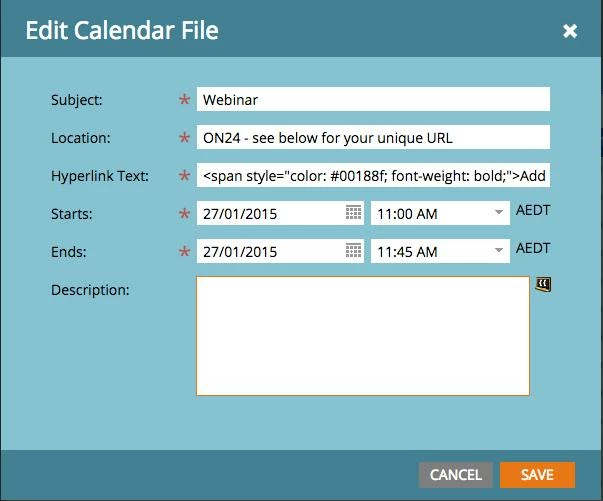
You can change the colour by adding the style into the hyperlink section of token, as below. Just change the hex colour in the text below to the one you want to use.

<span style="color: #ffffff; font-weight: bold;">Add to Calendar</span>

Hope that helps!
Bronwen

7 replies

Accepted solution
Feb 10, 2015 12:42 AM UTC
Hi Danielle

You can change the colour by adding the style into the hyperlink section of token, as below. Just change the hex colour in the text below to the one you want to use.

<span style="color: #ffffff; font-weight: bold;">Add to Calendar</span>

Hope that helps!
Bronwen

Translate
Feb 12, 2015 6:30 PM UTC
Thank you so much! This was very helpful. One more question: Is there a way to change the color of the underline? Or, remove the underline since this appears as a link. 

I was able to change the color; however, the underline still appears as the generic blue. 
Translate
Veronica_Holme4
Level 9
Jun 5, 2015 2:51 AM UTC

Hi Danielle - there's a good chance that this link colour is being driven centrally from the email CSS - you will need to adjust the link colour for the entire email there.

Translate
Level 3
Jun 17, 2015 1:03 PM UTC

Hi! I was able to change the color of the text as instructed above, but the underline is still there even after I added text-decoration = none. Any thoughts on how to eliminate the underline?

Translate
Oct 23, 2015 9:51 PM UTC

Anyone figure out how to get rid of the underline? Since it's a <span> tag, text-decoration: none; isn't working with the solution Bronwen offered.

Translate