Jul 9, 2015 4:40 PM UTC
Solved

How/Where can I set my status?

My 'Marketo Marketing Nation Community Updates' email keeps asking me to 'set a status update'.  I can't find where I would actually input this 'very important' status.

This post is no longer active and is closed to new replies. Need help? Start a new post to ask your question.
Accepted solution
Jul 9, 2015 6:48 PM UTC

Hi Roy - setting your status is easy once you know how...

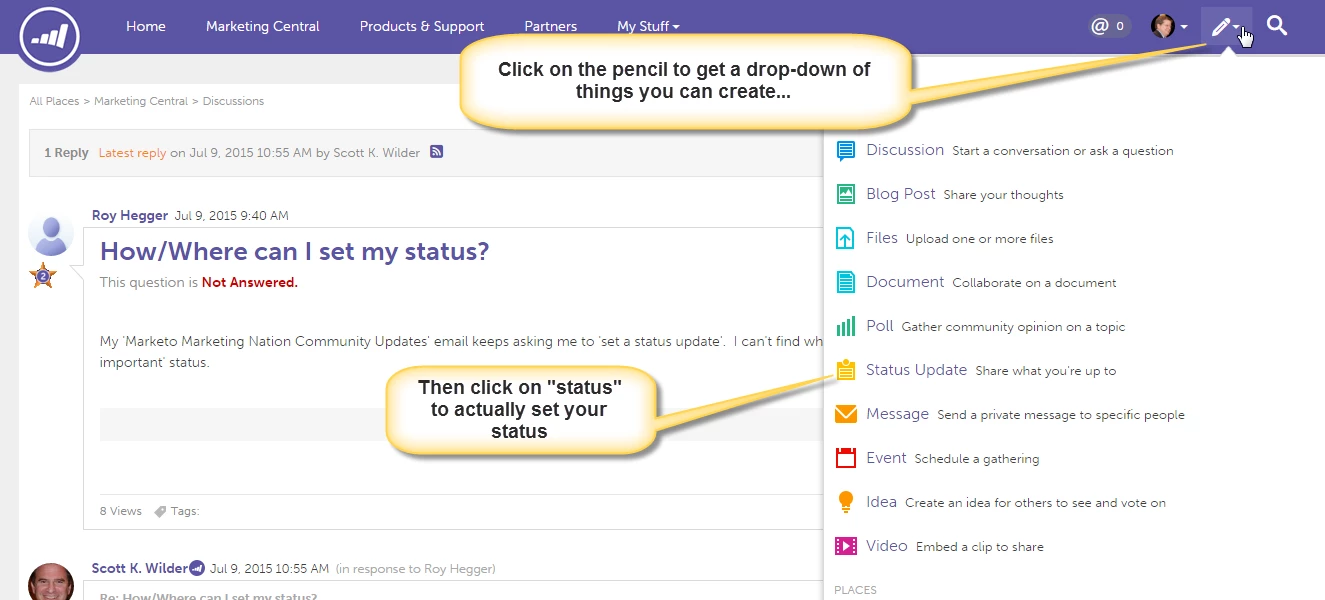
Click on the "pencil" in the upper right corner of the screen and you will get a drop-down menu.

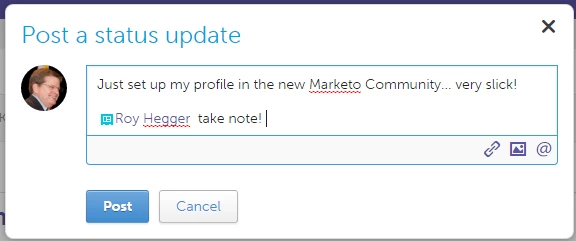
Click on "Status Update" to get to the dialogue box and then set your status.

Note that you can @ mention other people in the community, include a picture or link out to other resources from within a status (the links at the bottom).

2 replies

Jul 9, 2015 5:55 PM UTC

Roy Hegger​ Good morning. You can update your Preferences

nation.marketo.com/user-preferences!input.jspa

and your profile information by clicking on the avatar in the header, using the drop down and clicking Edit My Profile

Scott

Translate
Accepted solution
Jul 9, 2015 6:48 PM UTC

Hi Roy - setting your status is easy once you know how...

Click on the "pencil" in the upper right corner of the screen and you will get a drop-down menu.

Click on "Status Update" to get to the dialogue box and then set your status.

Note that you can @ mention other people in the community, include a picture or link out to other resources from within a status (the links at the bottom).

Translate