
Dan_Stevens_
Level 10
June 20, 2014
问题

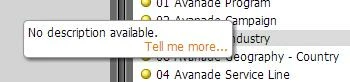
How to turn off descriptor "bubbles" in RCA

  • June 20, 2014
  • 1回复
  • 658查看
Each time I try to drag a dimension or metric (or right-click to add a filter) from the right side of RCA, these descriptor bubbles keep popping up beneath my mouse pointer, preventing me from dragging the attributes into my report.  Can these be turned off?  It's so annoying.

此主题已关闭回复。

1回复

June 26, 2014
Hi Dan,

Unfortunately, they can't be turned off, but we're fixing this in an upcoming release.  To give some context for others, this happens when panel is resized, not with the default size of the panel.  One alternative solution is to right-click, double-click, or drag-and-drop the grey bar.  It's not intuitiive, but it works.


TJ