Gautam_Chargotr
Level 2
February 7, 2020
解決済み

How to Remove space before subscript in emails on outlook?

  • February 7, 2020
  • 2 の返信
  • 5111 ビュー
No text available
このトピックへの返信は締め切られました。
ベストアンサー Ouida_Linkous

I can't take credit for this, but someone on my team (Juan Ngomo) shared this with me recently.  


When adding a superscript for items like ©, ®, th, st the email editor preview displays the superscript correctly but when the email is received, a space is added between the descriptive word or number and the superscript.



Few things can be done to solve this issue

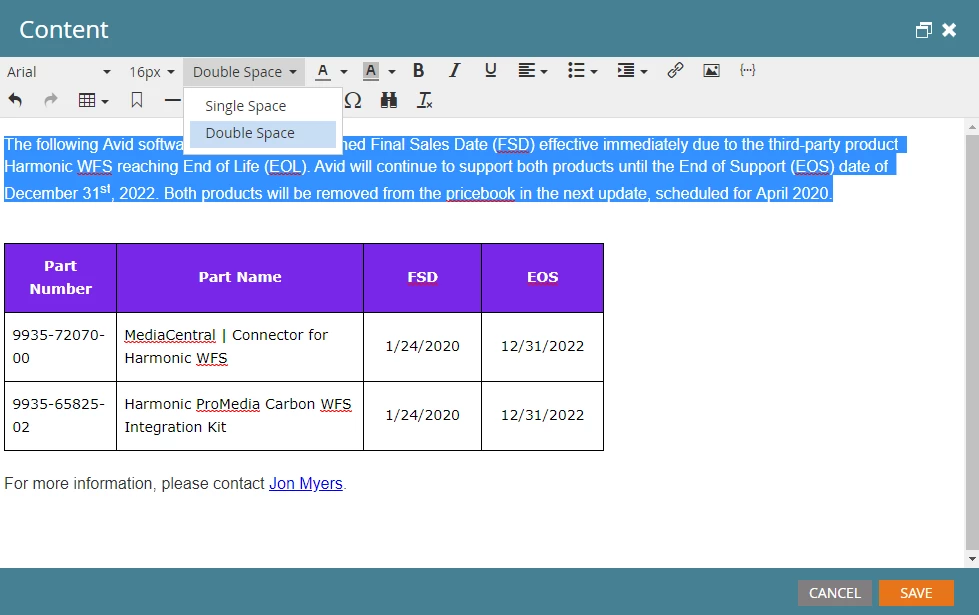
  1. Highlight the paragraph where the superscript was added & change it to "Double Space" as the image below (1)
  2. Open the editor and edit the HTML in the WYSIWYG editor. Change your <div> tags to <p> tags in the html code which is the same thing as the point 1.
  3. Also by surrounding the text with <span>31st</span> you can force the entire element to be rendered as one continuous line, this is also done in the editor


(1)

Hope this is helpful!!  


2 の返信

Ouida_Linkous
Level 2
February 7, 2020

I can't take credit for this, but someone on my team (Juan Ngomo) shared this with me recently.  


When adding a superscript for items like ©, ®, th, st the email editor preview displays the superscript correctly but when the email is received, a space is added between the descriptive word or number and the superscript.


Few things can be done to solve this issue

  1. Highlight the paragraph where the superscript was added & change it to "Double Space" as the image below (1)
  2. Open the editor and edit the HTML in the WYSIWYG editor. Change your <div> tags to <p> tags in the html code which is the same thing as the point 1.
  3. Also by surrounding the text with <span>31st</span> you can force the entire element to be rendered as one continuous line, this is also done in the editor


(1)

Hope this is helpful!!  


Gautam_Chargotr
Level 2
February 11, 2020

Thank you, it worked 🙂