How to locate the Landing page with only .html link and without any form and not in design studio. | Community
Skip to main content
Level 2
June 16, 2023
Solved

How to locate the Landing page with only .html link and without any form and not in design studio.

  • June 16, 2023
  • 2 replies
  • 1584 views

Looking for a solution to get the location of a landing page that has no form in it not even in the design studio, the LP is inside a program under Marketing activities, and we only have its .html link.

This post is no longer active and is closed to new replies. Need help? Start a new post to ask your question.
Best answer by Darshil_Shah1

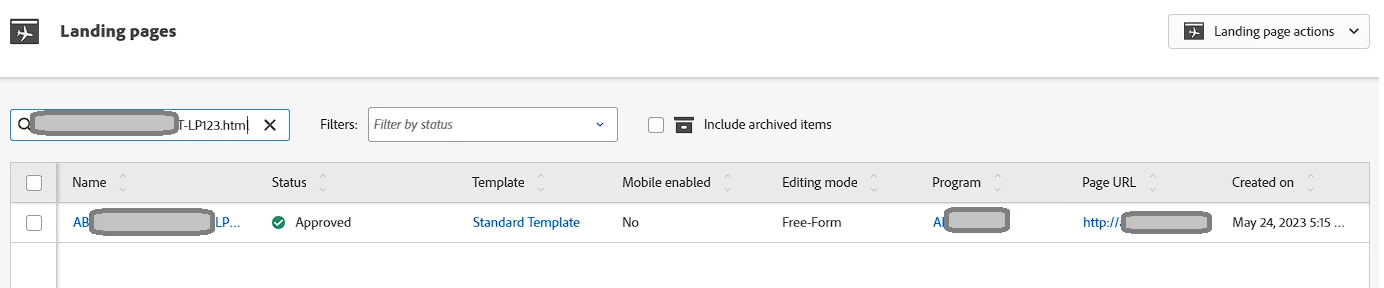
Well, you can search for the LP in the Design Studio > Select the Correct Workspace > Landing Pages > Search the LP with the LP link in the search bar (snapshot below). This works even if the LP is in the Marketing Activities as you can see in the snapshot below (the test LP below is created within a Program in the Marketing Activities):


2 replies

Darshil_Shah1
Adobe Champion and Community Advisor
Darshil_Shah1Adobe Champion and Community AdvisorAccepted solution
Adobe Champion and Community Advisor
June 16, 2023

Well, you can search for the LP in the Design Studio > Select the Correct Workspace > Landing Pages > Search the LP with the LP link in the search bar (snapshot below). This works even if the LP is in the Marketing Activities as you can see in the snapshot below (the test LP below is created within a Program in the Marketing Activities):


Level 2
June 16, 2023

Thanks, Darshil,


I think either I was looking in a different workspace, I tested this, and it's working fine.