January 7, 2013
解決済み

How do you make the initial value on a dropdown field blank?

  • January 7, 2013
  • 2 の返信
  • 1407 ビュー
How do you make the initial value on a dropdown field blank and have that trigger the required notification if the lead does not select a value?
このトピックへの返信は締め切られました。
ベストアンサー
in the Form Designer, select the field that you wish to edit. 

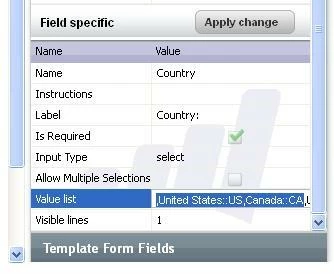
In its Field Specific Form Properties, select the Value field and add a comma at the start of the list of values similar to the screen shot below.

2 の返信

回答
January 7, 2013
in the Form Designer, select the field that you wish to edit. 

In its Field Specific Form Properties, select the Value field and add a comma at the start of the list of values similar to the screen shot below.

January 7, 2013
Thanks, I did that and it wasn't working, but discovered that it was because I had been cookied.