August 21, 2015
Respondido

How do I insert a PDF as hyperlink?

  • August 21, 2015
  • 2 comentários
  • 2753 Visualizações

Can anyone please advise how I am suppose to insert a PDF as a hyperlink into an email ?  PDF is already saved in my design studio as a PDF doc?

Este tópico foi fechado para respostas.
Melhor resposta por Scott_Daily

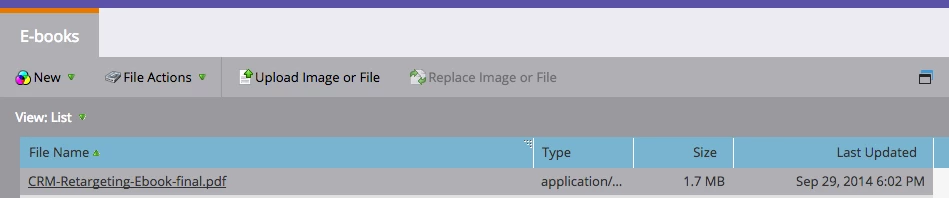
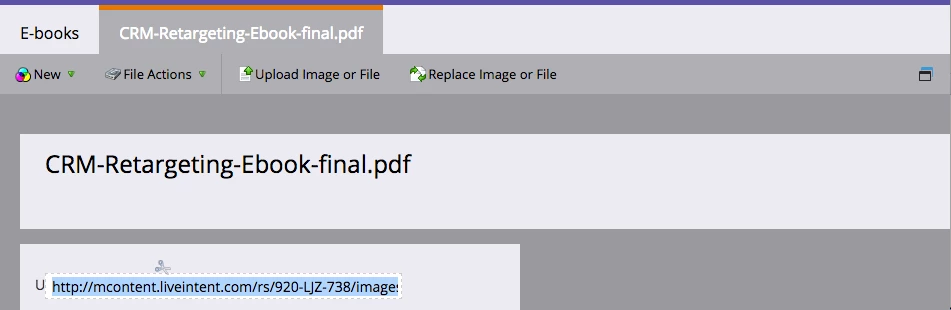
Hi Louisa Windt​! Here are screenshots of me copying the URL created in Design Studio from a PDF we uploaded.

1. Identify which PDF you want the link for and click on the specific File Name.

2. You will be taken to a new view where you can capture the URL, highlight in blue below.

From there, you can use that URL to link any text, image, etc. you want!


Hope that helps

Scott

2 comentários

Scott_Daily
Scott_DailyResposta
Level 3
August 21, 2015

Hi Louisa Windt​! Here are screenshots of me copying the URL created in Design Studio from a PDF we uploaded.

1. Identify which PDF you want the link for and click on the specific File Name.

2. You will be taken to a new view where you can capture the URL, highlight in blue below.

From there, you can use that URL to link any text, image, etc. you want!


Hope that helps

Scott

August 21, 2015

Thanks a ZILLION!  It worked.  Much appreciated.