Oct 14, 2014 8:23 PM UTC
Solved

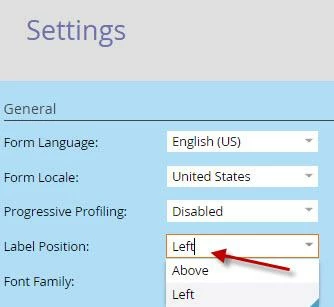
How can you line the check box up to be next to your copy?

In a form, I would like someone to be able to select multiple answers by checking boxes. When I add them to the form, the checkbox is below the copy. Is there a way to line them up?

Thank you,
Mandy

This post is no longer active and is closed to new replies. Need help? Start a new post to ask your question.
Dory_Viscoglio
Dory_ViscoglioAccepted solution
Level 10
Oct 14, 2014 8:37 PM UTC
Hi Mandy, in the settings of the form, do you have the label position as Left, or Above?


4 replies

Kenny_Elkington
Adobe Employee
Adobe Employee
Oct 14, 2014 8:29 PM UTC
Hey Mandy,

You can drag and drop all fields in a Marketo form.  Is this not working for you?
Translate
Oct 14, 2014 8:35 PM UTC
 No, it is placing the checkbox under the copy field. I want to pull the box up next to the copy...see below for the way it looks in the form and also on my landing page. 

 
Translate
Dory_Viscoglio
Dory_ViscoglioAccepted solution
Level 10
Oct 14, 2014 8:37 PM UTC
Hi Mandy, in the settings of the form, do you have the label position as Left, or Above?


Translate
Oct 14, 2014 8:44 PM UTC
Thank you!! It worked :) 
Translate