Help creating batch emails | Adobe Higher Education
Skip to main content
Level 2
February 28, 2024
Respondido

Help creating batch emails

  • February 28, 2024
  • 5 respostas
  • 2414 Visualizações

Hi, I'm looking to set up a few filter-based batch emails based on inactivity of leads in order to remarket to them. I'm looking to set it up with fields directly speaking with our custom MS Dynamics CRM. 

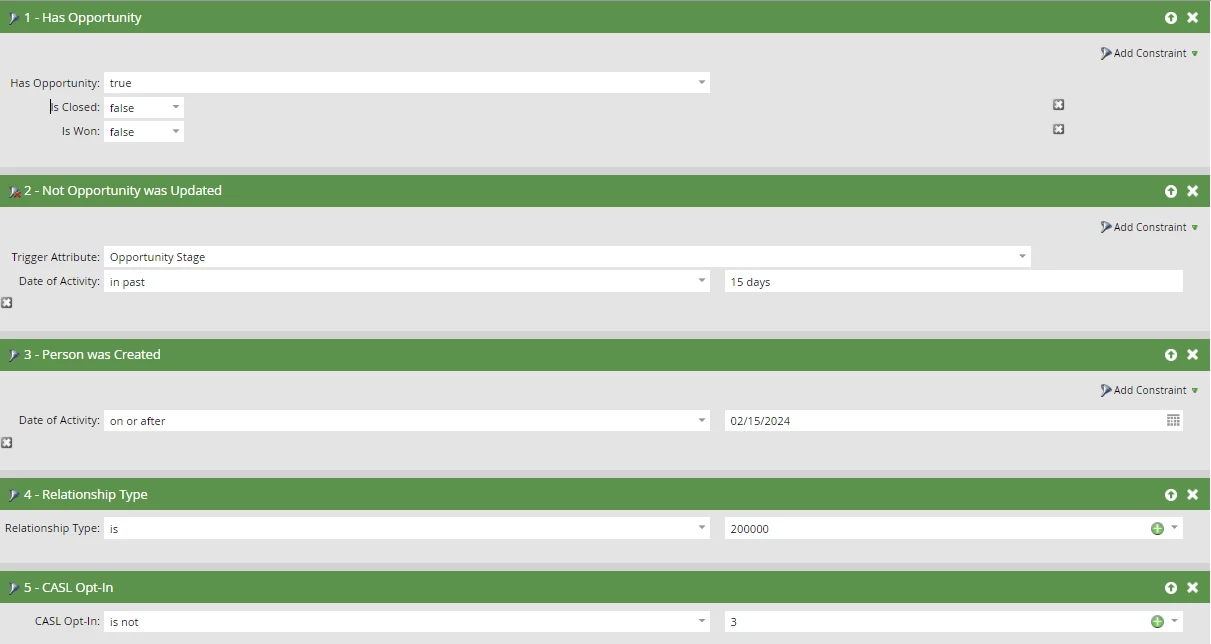
These are the filters I'm using but it still seems to be qualifying people on a daily basis (as soon as they are created) but it should qualify them only when they complete 15 days of no change. Can someone tell me what I'm doing wrong?



Este tópico foi fechado para respostas.
Melhor resposta por SanfordWhiteman

Think you’re misunderstanding how Not Opportunity Was Updated works.


Your filter means “the person has no Opportunities where the Opportunity Stage field was updated in the past 15 days”, where the 15 days is an offset from the time the batch runs.


This would naturally include people who had a single Opportunity created (and not updated) today, because, well... they have no Opportunities where the Opportunity Stage field was updated in the past 15 days!

5 Respostas

Darshil_Shah1
Adobe Champion and Community Advisor
February 28, 2024

@jkathuria, You haven't supplied the filtering logic. Is it ANY/AND/Advanced filtering logic? Without that, we can't say for sure why it isn't working as per your expectations. Additionally, these are all filters and not triggers. Also, you can't trigger inactivity; only filter based on that.

Level 2
February 28, 2024

Thanks Darshil, I corrected my post. I'm running it as a batch campaign. I'm using ALL filters as the logic because it should only meet all these filters before qualifying a lead. Does that help? 

SanfordWhiteman
Level 10
February 29, 2024

Think you’re misunderstanding how Not Opportunity Was Updated works.


Your filter means “the person has no Opportunities where the Opportunity Stage field was updated in the past 15 days”, where the 15 days is an offset from the time the batch runs.


This would naturally include people who had a single Opportunity created (and not updated) today, because, well... they have no Opportunities where the Opportunity Stage field was updated in the past 15 days!