Jasbirka
Level 6
Nov 6, 2026 7:54 AM UTC
Solved

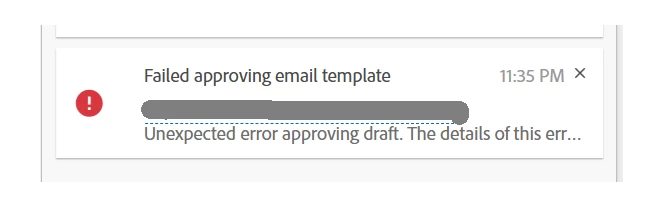
Getting an error while approving the Email Template

Hi Everyone,

I have been trying to approve an email template for the past hour, but I am unable to approve or discard it. I also cannot see the updated changes; it seems to be stuck.

Could someone please guide me on this?


    Michael_Florin-2
    Michael_Florin-2Accepted solution
    Level 10
    Nov 10, 2026 11:38 AM UTC

    Well, the above article tells you that you can only have 500 emails associated with one template, which I consider a ridiculously low number. So I’d open a support ticket and complain.

    One of my clients had 7500 emails used by one template, and we were not able to approve that template anymore. Even with Marketo support involved. That left us no choice other than to create a new template and migrate all Program Templates. Which was hard.
     

    By the way: I’m certain that this 500 email limit didn’t exist in the docs a few months ago. I think it came with Marketo’s move to AWS, which made a lot of things slower than they were before. But that’s just a conspiracy theory.

    9 replies

    Crystal_Pacheco
    Level 4
    Nov 6, 2026 2:56 PM UTC

    Hi ​@Jasbirka there might be a syntax error preventing you from approving the email template. Inside the email template’s html editor, in the top left menu Email Template Actions > Select Validate HTML.  Do you have any errors?


    Translate
    Jasbirka
    JasbirkaAuthor
    Level 6
    Nov 10, 2026 7:12 AM UTC

    Hi ​@Crystal_Pacheco - There is no error in the template.

    Translate
    Michael_Florin-2
    Level 10
    Nov 6, 2026 10:01 PM UTC

    How many emails do you have associated with that template? I’m asking because Marketo documentation claims that approving the template becomes problematic once you have more than 500 emails using it.

    https://experienceleague.adobe.com/en/docs/marketo/using/product-docs/email-marketing/general/email-editor-2/create-an-email-template

    CAUTION

    While there is no hard limit, once an email template is used by over 500 emails, re-approving that template after an update could result in performance issues. We recommend that once an email template has 500 emails associated to it, to create a new template.


    Translate
    Jasbirka
    JasbirkaAuthor
    Level 6
    Nov 10, 2026 7:20 AM UTC

    ​@Michael_Florin-2 - Yes, there are over 500 emails.

    I have updated the template, but I am now unable to approve or discard it. Since the template is still in draft mode, I am concerned that someone might mistakenly edit it and cause issues. What should I do?

    Translate
    Michael_Florin-2
    Michael_Florin-2Accepted solution
    Level 10
    Nov 10, 2026 11:38 AM UTC

    Well, the above article tells you that you can only have 500 emails associated with one template, which I consider a ridiculously low number. So I’d open a support ticket and complain.

    One of my clients had 7500 emails used by one template, and we were not able to approve that template anymore. Even with Marketo support involved. That left us no choice other than to create a new template and migrate all Program Templates. Which was hard.
     

    By the way: I’m certain that this 500 email limit didn’t exist in the docs a few months ago. I think it came with Marketo’s move to AWS, which made a lot of things slower than they were before. But that’s just a conspiracy theory.

    Translate
    Jo_Pitts1
    Community Advisor
    Community Advisor
    Nov 24, 2026 9:30 PM UTC

    ​@Jasbirka , the other issue (that I don’t believe is documented anywhere) is that if you have a really long email name (I can’t remember how long - maybe 50 characters?) it blocks approvals.  If you can find a long email name and shorten it, then it may resolve your issue.

    Translate
    Jasbirka
    JasbirkaAuthor
    Level 6
    Nov 25, 2026 5:54 AM UTC

    ​@Jo_Pitts1 -

    Are you referring to the Email Template name? The name is limited to approximately 40 characters.

    Additionally, I heard that if a template is used for a high volume of emails—typically over 1,000 to 1,500—approval can take anywhere from four days to a week.

    However, I am curious about how we should handle truly urgent updates, as we cannot wait a week. Is creating a new template our only remaining option?

    Translate