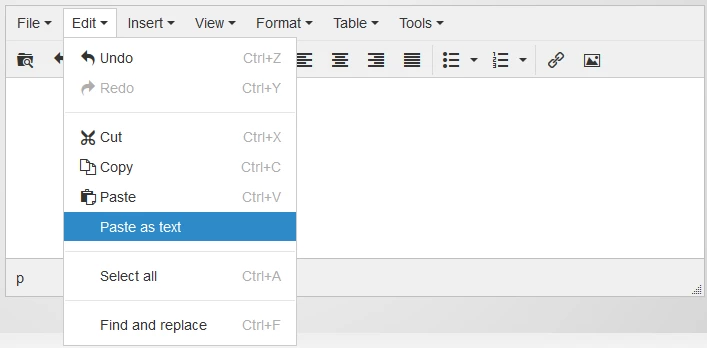
Enable the "paste as text" feature in the rich-text editor
I realize @Justin Cooperman and his team will be making some minor usability enhancements to the new version of TinyMCE (the inline, rich-text editor for emails, landing pages, etc.) based on some of the initial feedback received here in the community. One of the things that causes more time than necessary is when copying/pasting text from Word, Outlook or anything that's not plain text. Our workflow always includes a step to first copy/paste the text into Notepad; and then copy/paste from Notepad into the editor. These steps would be unnecessary if Marketo just enabled the "Paste as text" feature of the editor. There are a couple other features that I'd like to see (like showing the block level detail - p, h1, h3, etc. - in the bottom status bar), but this is top on my list.