Feb 5, 2015 4:18 PM UTC
Solved

Email allowing response Yes or No

Whats the best way to go about: 

Sending an email allowing the recipient to click Yes or No, where this response is maintained for further marketing?

Thanks ~
This post is no longer active and is closed to new replies. Need help? Start a new post to ask your question.
Accepted solution
Feb 5, 2015 4:37 PM UTC
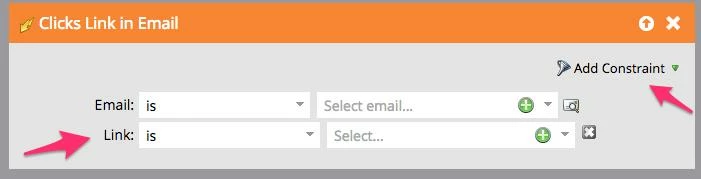
Hey David, you can actually specify the link using the "Clicks Link in Email" trigger, but you need to add a constraint from the drop-down like so: 

5 replies

Feb 5, 2015 4:30 PM UTC
I only see a filter for "clicks link on web page - link name" that allows targeting link name.

The filter "clicks link in email" doesnt allow targeting link name, so it would seem this cant be done directly from the email. It would have to be done from a landing page - correct? Please explain.

Thanks ~
Translate
Feb 5, 2015 4:35 PM UTC
I would do the following:

- make a unique confirmation page for both yes and no. 
- set up a custom picklist or checkbox field on the lead (and if applicable, contact) record -- e.g, "Opt In Status" with values yes/no
- set up two smart campaigns to listen for the clicks and update the data values

SMART LIST
Clicks link in email [email name]
Link is [link URL]

FLOW STEPS
Change Data value 
[your field] = Yes

Repeat the above for the second link and data value, and you're good to go! 
 
Translate
Accepted solution
Feb 5, 2015 4:37 PM UTC
Hey David, you can actually specify the link using the "Clicks Link in Email" trigger, but you need to add a constraint from the drop-down like so: 

Translate
Feb 5, 2015 4:41 PM UTC
Thanks Justin (!!!)
Translate
Feb 5, 2015 4:43 PM UTC
No worries!
Translate