Lucho_Soto
Level 5
November 11, 2016
Risolto

Edit Select Arrow Styling in Forms

  • November 11, 2016
  • 2 risposte
  • 4542 visualizzazioni

Hi Marketo Community,

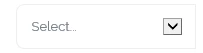
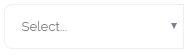
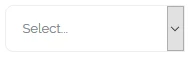
I'm trying to customize the downwards arrow next to "select" type questions on a Marketo form. Explorer, Chrome and Firefox all render the arrow differently (screenshots below) and I haven't been able to find anything in the form CSS that controls this.

I would also like to edit the outline of the dropdown once the arrow is clicked, this also varies among browsers. Any help/tips would be appreciated, thanks!

Explorer
Chrome
Firefox
Questo argomento è stato chiuso alle risposte.
Migliore risposta di SanfordWhiteman

<SELECT> tags by definition vary among browsers, and can only be partially restyled. There's no standard unless you replace the entire widget with a custom component. (This isn't a Marketo limitation.)

2 risposte

SanfordWhiteman
Level 10
November 11, 2016

<SELECT> tags by definition vary among browsers, and can only be partially restyled. There's no standard unless you replace the entire widget with a custom component. (This isn't a Marketo limitation.)

Lucho_Soto
Level 5
November 11, 2016

That makes sense, thanks for your help.
