Level 2
Aug 20, 2024 8:19 AM UTC
Solved

E-Mail Template: Replace color codes in Dropdown Menu with Color Names

Hey guys, 

we are currently trying to optimize our e-mail template and are therefore using the possibilities Marketo gives us in coding and designing the HTML. 


 When defining variables, we also use a dropdown to give users the choice of a predefined background color: 
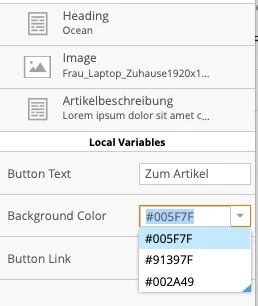
As you can see, the values users can choose from are the Color codes in HEX format. My question is: Is it possible for us to replace these codes with "color names", so users don't have to choose from a cryptic code but can instead choose the color they like? 


The code in our template inside the <head> Part currently looks like this: 

 
<meta class="mktoList" id="TDM-Background" mktoName="Background Color" values="#005F7F, #91397F, #002A49" mktoModuleScope="true">
 
Thank you in advance and best regards! 

 

This post is no longer active and is closed to new replies. Need help? Start a new post to ask your question.
SanfordWhiteman
SanfordWhitemanAccepted solution
User Group Leader
Aug 21, 2024 3:39 AM UTC

Some people add a /* CSS comment */ in front of the hex code.

8 replies

SanfordWhiteman
User Group Leader
SanfordWhitemanUser Group LeaderAccepted solution
User Group Leader
Aug 21, 2024 3:39 AM UTC

Some people add a /* CSS comment */ in front of the hex code.

Translate
Disha_Goyal6
Community Advisor
Community Advisor
Aug 21, 2024 4:53 AM UTC

Hi @artur92, I don't think there is a way to define color name. If we add color name then value will not render correctly.


Translate
SanfordWhiteman
User Group Leader
User Group Leader
Aug 21, 2024 6:45 AM UTC

Did you read my comment? (And there’s another way, too: use a CSS variable in addition to the hex code.)

Translate
artur92Author
Level 2
Aug 21, 2024 1:48 PM UTC

Hi SanfordWhiteman, 


thanks for the tip with the comments, it works great! Simple and smart, just how I like it 🙂 

The other way does sound a little bit more complex, but just out of curiosity: How would I accomplish this with using CSS variables? 


Best regards 

Translate