Adrien_Evangeli
Level 1
January 27, 2023
Solved

Displaying multiples thank you pages according to multiple conditions on the form

Hello Marketo Com,


We are working on our thank you pages on MKTO but we want to have 2 conditions in order to display a different thank you page according to 2 form fields. 


Example : If field XXX is "123" and if field YYY is "234" Follow up page is "456"  

And etc. in order to have multiple thank you pages according to 2 conditions.


There is a screenshot but looks like we can't have 2 conditions together.
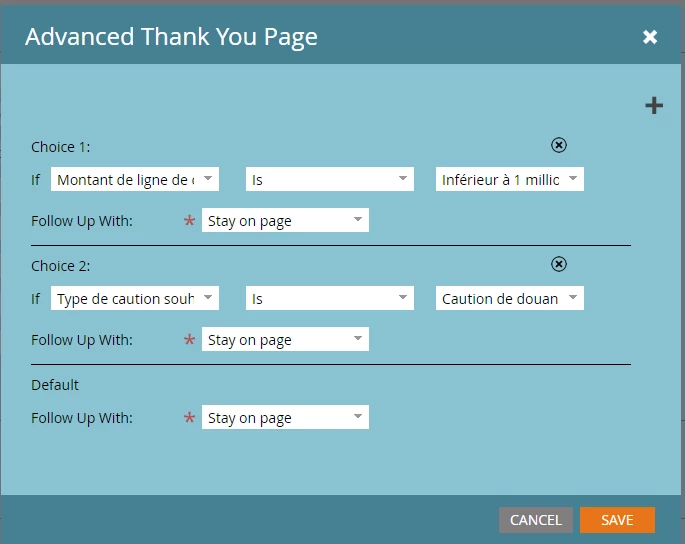
 

Thank you for your help! 


Best

Adrien EVANGELISTA

ALLIANZ TRADE FRANCE

 

This post is no longer active and is closed to new replies. Need help? Start a new post to ask your question.
Darshil_Shah1
Darshil_Shah1Accepted solution
Adobe Champion, Community Advisor, UG Leader
January 27, 2023

This could be done very easily using the Marketo Forms2 JS library - 


MktoForms2.loadForm("pages.example.com", "AAA-BBB-CCC", <insert-form-id>, function(form) { form.onSuccess(function(values, followUpUrl) { var vals = form.getValues(); if (vals.Field1 == "value1" && vals.Field2 == "value2") { //replace values & fields with the actual values location.href = "https://example.com/page1"; //add thank you page1 URL } else if (vals.Field1 == "value3" && vals.Field2 == "value4") { //replace values & fields with the actual values. location.href = "https://example.com/page2"; //add thank you page2 URL } //add more conditional statements if required return false; }); });


Since this is not configured at the form-level, you'd need to add script on webpages using this form, contrary to the form-level updates which get applied to all the pages using form upon approving the LPs.


1 reply

Darshil_Shah1
Adobe Champion, Community Advisor, UG Leader
Darshil_Shah1Adobe Champion, Community Advisor, UG LeaderAccepted solution
Adobe Champion, Community Advisor, UG Leader
January 27, 2023

This could be done very easily using the Marketo Forms2 JS library - 


MktoForms2.loadForm("pages.example.com", "AAA-BBB-CCC", <insert-form-id>, function(form) { form.onSuccess(function(values, followUpUrl) { var vals = form.getValues(); if (vals.Field1 == "value1" && vals.Field2 == "value2") { //replace values & fields with the actual values location.href = "https://example.com/page1"; //add thank you page1 URL } else if (vals.Field1 == "value3" && vals.Field2 == "value4") { //replace values & fields with the actual values. location.href = "https://example.com/page2"; //add thank you page2 URL } //add more conditional statements if required return false; }); });


Since this is not configured at the form-level, you'd need to add script on webpages using this form, contrary to the form-level updates which get applied to all the pages using form upon approving the LPs.


Translate