December 18, 2017
Solved

Did Marketo Market a Change to Appearance Filters with Multiple Values?

Am I dreaming? Didn't you used to be able to see at a glance if Smart List filters contained multiple values without having to hover with the mouse? I keep getting alarmed thinking filters are missing key values but then when I hover I see they are there. E.g.:
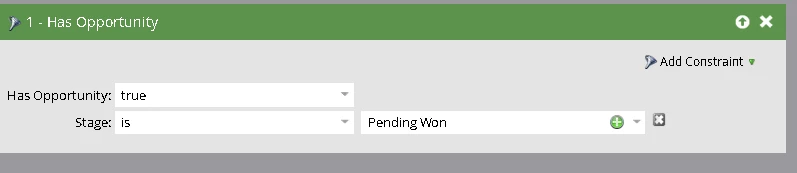
Looks like the filter is ONLY looking for Stage is "Pending Won." But when I hover with the mouse I can see there are actually multiple values:
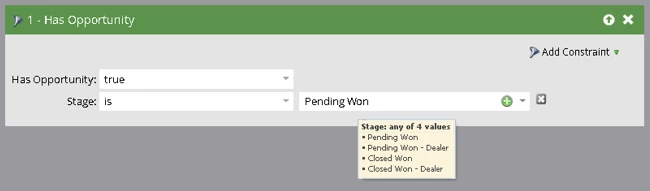
I don't think I'd be reacting with alarm if it was always this way. It's a TERRIBLE change, in my opinion. Has anyone else noticed this? Or has it really always been this way and am I just losing my mind?

Denise

This post is no longer active and is closed to new replies. Need help? Start a new post to ask your question.
Steven_Vanderb3
Steven_Vanderb3Accepted solution
Adobe Employee
December 18, 2017

You're completely sane, it's a UI bug   Our engineers are aware and working on a fix.

4 replies

Steven_Vanderb3
Adobe Employee
Steven_Vanderb3Adobe EmployeeAccepted solution
Adobe Employee
December 18, 2017

You're completely sane, it's a UI bug   Our engineers are aware and working on a fix.

Translate
Dan_Stevens_
Level 10
December 18, 2017

I think what's happening here is the TYPE of filter.  Marketo still lists multiple values, separated by commas for most filters/triggers.  It just so happens that this specific filter doesn't reflect the typical behavior.

Translate
December 18, 2017

Hey Dan - In case you didn't notice, Steven Vandenberg from Marketo said this was bug. See above.

Translate
December 18, 2017

Thank you for the reassurance about my sanity! And I'm also relieved to know Marketo didn't decide this was a good idea.

Translate