Hi @Vinay_Kumar @Sant_Singh_Rath @Dave_Roberts Thanks for your questions. Regarding your ideas, solved questions, and other content, please note that a portion of community content published between late November 2025 to mid-January 2026 has not fully migrated to the new Community. We are working to resolve this with the platform team.
As for levels - we did a restructuring of our gamification model as part of the migration which removes level visibility for our advocates (including Community Advisors and Adobe Champions).
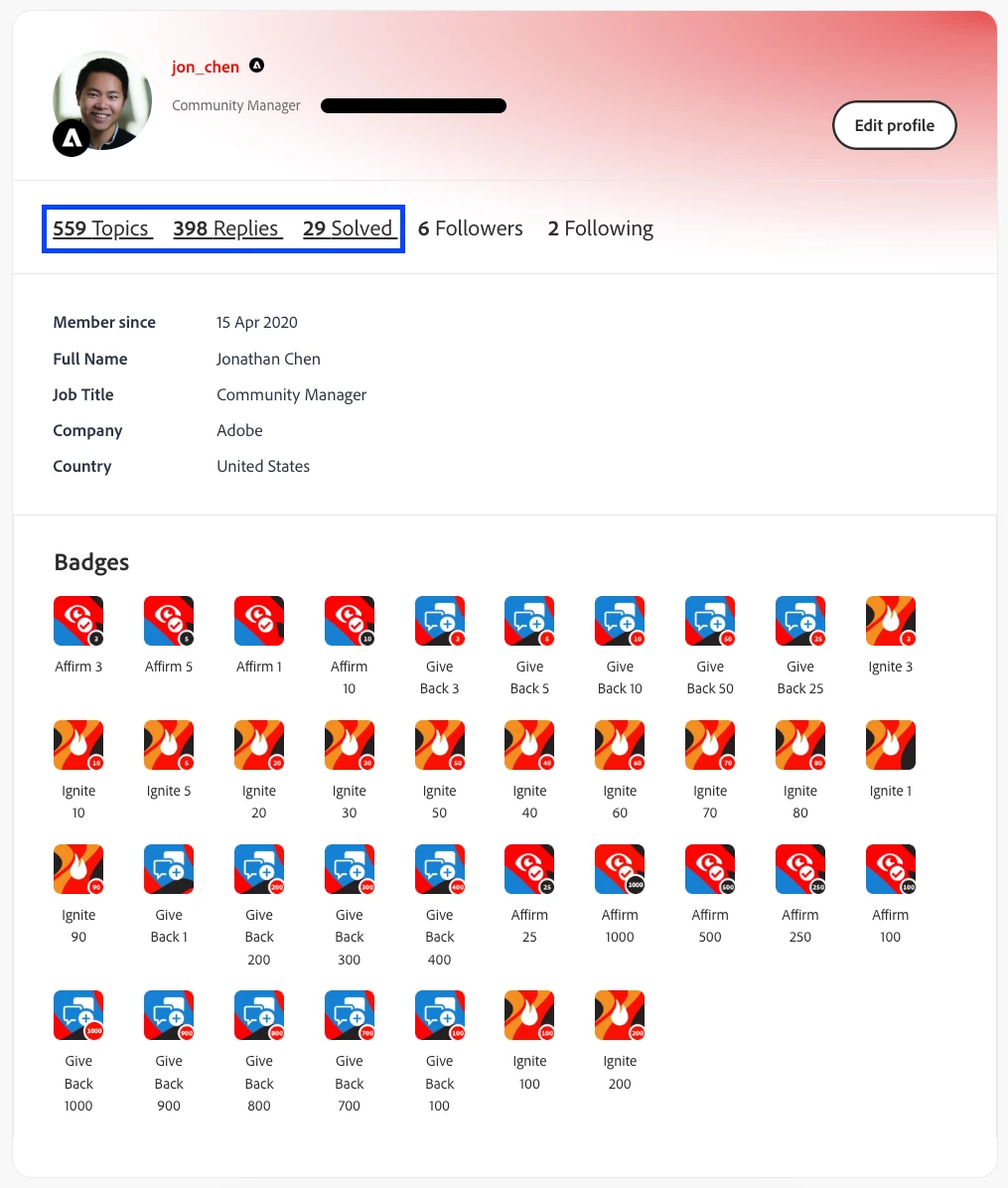
Lastly, accessing your profile contributions and badges can be done by clicking on your avatar on any post, as Dave confirmed. You can also access your profile by hovering over your avatar dropdown at the top right of any page and selecting “My Community profile.” From there, please click on any of the underlined tabs “Topics”, “Replies”, or “Solved”, to view your filtered contributions. Please see the photo for details.
Hope that’s helpful, and let me know if you have any further questions.
… after posting this, I notice that if I hover over my profile pic in the previous post ^^ I get a pop-up with badges and level, etc and I can click my profile image to view my “member” page but I don’t see anywhere in the interface where I can access this otherwise. Anyone know if this just got looked over in the migration or if there is a more straight-forward path to view my “member page”?
Hi @Vinay_Kumar @Sant_Singh_Rath @Dave_Roberts Thanks for your questions. Regarding your ideas, solved questions, and other content, please note that a portion of community content published between late November 2025 to mid-January 2026 has not fully migrated to the new Community. We are working to resolve this with the platform team.
As for levels - we did a restructuring of our gamification model as part of the migration which removes level visibility for our advocates (including Community Advisors and Adobe Champions).
Lastly, accessing your profile contributions and badges can be done by clicking on your avatar on any post, as Dave confirmed. You can also access your profile by hovering over your avatar dropdown at the top right of any page and selecting “My Community profile.” From there, please click on any of the underlined tabs “Topics”, “Replies”, or “Solved”, to view your filtered contributions. Please see the photo for details.
Hope that’s helpful, and let me know if you have any further questions.
@jon_chen Thanks for your response. I understand.
Can you please share what does this mean? I assume this is indicating Level, if so than I was at level 10. or does this represent progress or profile completion or something?
Hi @Vinay_Kumar the bar you’re referencing is the reputation bar, which is based on how much help a user has given to the Community. It is separate and distinct from the levels you see next to Community usernames (Level 1 - 10).
I’ve encountered this issue several times (around 3–4 instances). When I start typing a reply, the first word disappears within a few seconds, and any text I type afterward doesn’t appear in the reply field.
On a previous occasion, I completed my reply but was unable to post it. After clicking Send, the page simply reloaded and my response disappeared. When I tried again, the same thing happened. However, the next day, I noticed that my reply had been posted twice.
I experienced the same issue again today. I attempted to post here but was unable to do so initially. After reloading the page 2–3 times, I was finally able to submit my reply. Unfortunately, this workaround doesn’t always work, and there are times when I’m still unable to post my content.