Level 2
February 14, 2017
Solved

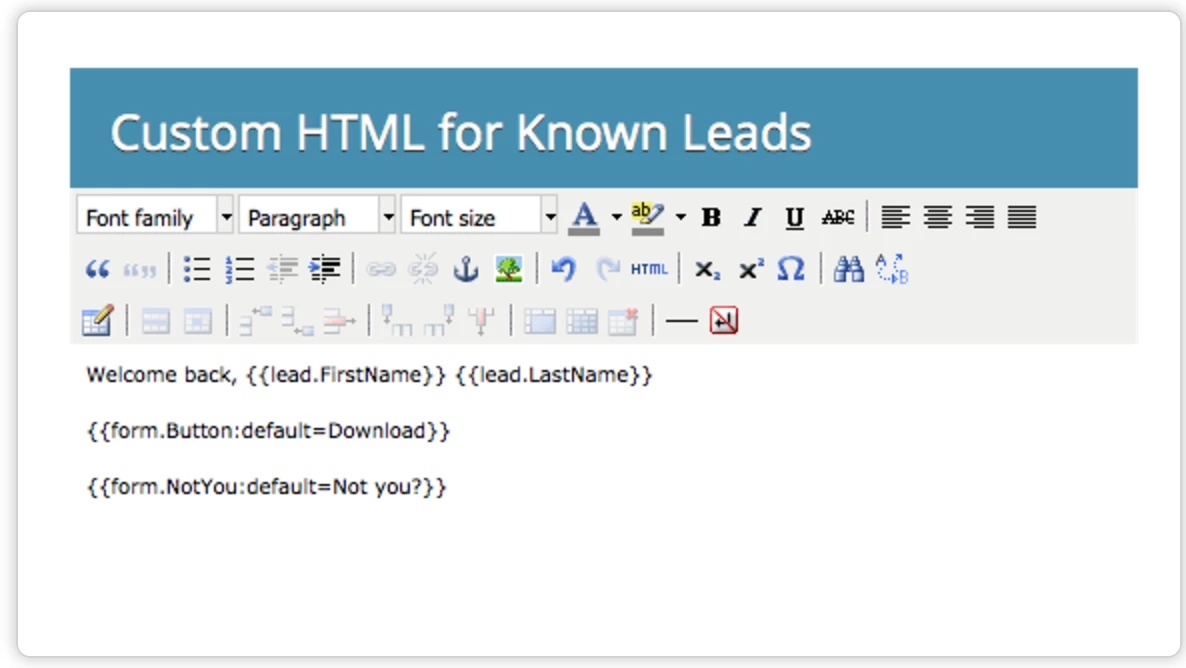
Custom HTML for Known leads

Can anyone help me with Custom HTML form code to accommodate french characters.

I'm trying to change default text Download to Télécharger in form button. But Marketo is not supporting.
SanfordWhiteman
SanfordWhitemanAccepted solution
Level 10
February 14, 2017

I did give you the exact code: add that to your Custom CSS in Form Editor.

9 replies

SanfordWhiteman
Level 10
February 14, 2017

Please move the thread to Products​. (Marketing Central is supposed to be for more general questions as opposed to product support.)

This is a known bug. Simple workaround: set the default button value to empty ( {{form.Button:default=}} ) and use CSS for the button text instead.

.mktoTemplateBox BUTTON[type="submit"]:after {

  content: "Télécharger";

}

Translate
Level 2
February 14, 2017

Hi Sanford,

Thanks for your help. I really appreciate it. I'm unable to still fix this.

I'm not a tech guy could you please provide the exact code to be used.

Regards

Pradeep

Translate
SanfordWhiteman
SanfordWhitemanAccepted solution
Level 10
February 14, 2017

I did give you the exact code: add that to your Custom CSS in Form Editor.

Translate
SanfordWhiteman
Level 10
February 16, 2017

Whoa, large image!

Yes, there's another bug here that I was expecting you to encounter. Don't clear the whole default. Just leave the first letter "V".  Then have just "ous n’êtes pas" in the CSS. Weird, but works.

Translate
Level 2
February 16, 2017

Very Wierd.  But ultimately it worked.

Translate
SanfordWhiteman
Level 10
February 18, 2017
