
Brian_Law_MKTO
Level 5
Mar 24, 2016 10:53 PM UTC

Converting a Lead into a Contact in Salesforce

When a record is converted in SFDC from a lead to a contact Marketo automatically changes the SFDC Type field from Lead to Contact.

The change in SFDC type doesn’t cause a data value change so the Data Value Changes trigger and filter won’t work for SFDC Type. You will need to use the Lead is Converted trigger or Lead was Converted.
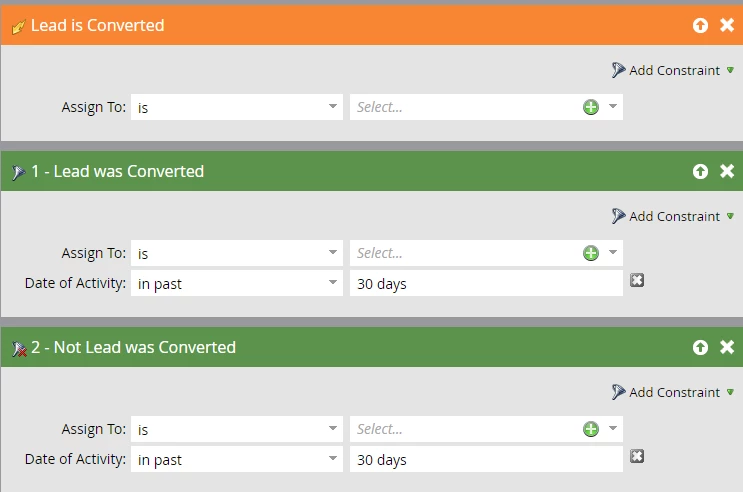
Alternatively you could use a different field such as Lead Status = Converted.

Make sure your lead custom fields are mapped.

During the conversion the Marketo ID stays with the record converted to a contact.

This post is no longer active and is closed to new replies. Need help? Start a new post to ask your question.

3 replies

Jan 19, 2017 3:12 PM UTC

Hi

I just found this article and I'm hoping to use Lead is Converted trigger but confused about the "Assign to" option.  What goes there?  Who we want the Lead assigned to?  In our scenario, we are looking for Leads that were converted to Contacts in SFDC, therefore they are already assigned. Plus, it's a trigger not a flow step.

Or, is it filtering who the Lead/Contact is already assigned to? And we have to put all options of who Leads/Contacts might be assigned to there?

Thanks in advance,

Christine

Translate
Jan 19, 2017 5:24 PM UTC

Hi Christine,

To my knowledge, it allows you to filter based on the current contact assignment. We usually just put "is not empty" unless we need to filter to a specific rep or territory.

Translate
Jan 19, 2017 9:00 PM UTC

Oh, "is not empty" makes sense! Thanks!

Translate