Question
Changing the picklist DISPLAY values within visibility rules
So based on testing, I think the answer to this is sadly going to be "Not possible," but reaching out to all of the experts here in the hope that I am wrong:
Love the visilbity functionality of Forms 2.0 where I can change how the field label for, say, Question 2 appears based on how they answered Question 1. What I'm wondering is if I can take that one step deeper.
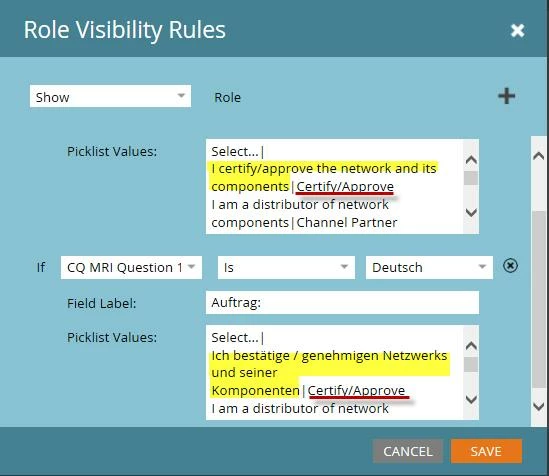
I would like the display values on Question 2 to change depending on how they answered Question 1. See screen shot below for how I was trying to do it. Since the picklist values show up in the "Advanced Editor" style, I thought I could change the display value as well as the field label. But when I preview, it doesn't hold and still shows the standard display values in the picklist. Obviously, if I'm asking the customer if they prefer German in Question 1, I would like the subsequent choices they choose from in other questions to appear in German (not just the label). And I certainly would prefer NOT to have to have a set of custom language questions with translated picklist value for each language I want to support on this global form. Yucky.
Am I going about this wrong, or is it just not possible via Forms 2.0 functionality? And if it's not possible, is there jscript that could do it behind the scenes. I have access to a web developer on my team, but I'd like to have a sense of what I'm asking of her before I do it.
Thanks!
Love the visilbity functionality of Forms 2.0 where I can change how the field label for, say, Question 2 appears based on how they answered Question 1. What I'm wondering is if I can take that one step deeper.
I would like the display values on Question 2 to change depending on how they answered Question 1. See screen shot below for how I was trying to do it. Since the picklist values show up in the "Advanced Editor" style, I thought I could change the display value as well as the field label. But when I preview, it doesn't hold and still shows the standard display values in the picklist. Obviously, if I'm asking the customer if they prefer German in Question 1, I would like the subsequent choices they choose from in other questions to appear in German (not just the label). And I certainly would prefer NOT to have to have a set of custom language questions with translated picklist value for each language I want to support on this global form. Yucky.
Am I going about this wrong, or is it just not possible via Forms 2.0 functionality? And if it's not possible, is there jscript that could do it behind the scenes. I have access to a web developer on my team, but I'd like to have a sense of what I'm asking of her before I do it.
Thanks!