Danielle_Wong
Community Advisor
Community Advisor
February 5, 2018
解決済み

Best way to have two workspaces share the same database?

  • February 5, 2018
  • 4 の返信
  • 2312 ビュー

Anyone have an instance set up like this?

Thanks!

このトピックへの返信は締め切られました。
ベストアンサー

Hi.  You can create multiple workspaces that use the same database.  Primarily the benefit is to limit the access to programs and assets.  I've done this in the past where we had one global lead database, but different business teams with limited access to their resources.  You can then use the roles (or create new ones) that will restrict the types of things that can be done.  We did this so we would have one view of the customer and permissions, but the customer may work with multiple business units.

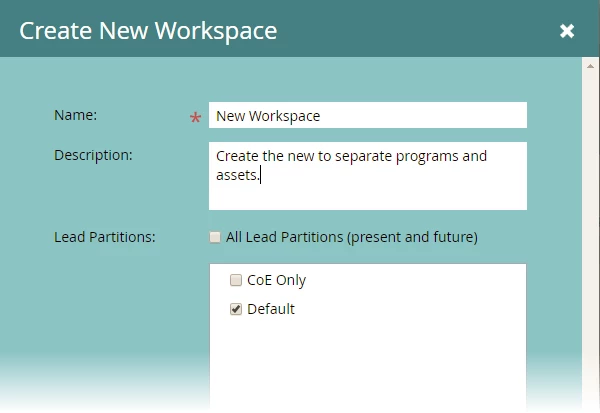
First create the new workspace and make sure that it has access to the same database...
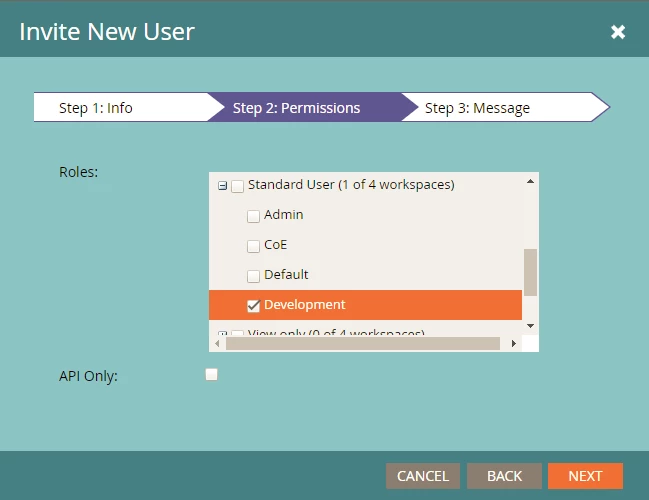
Second, create or edit the user and select the only the workspace permission(s) that you want them to have.
Does this answer your question?

4 の返信

Josh_Hill13
Level 10
February 5, 2018

Can you describe more of what you want to do?

Workspaces can be pointed at any # of partitions.

Danielle_Wong
Community Advisor
Danielle_WongCommunity Advisor作成者
Community Advisor
February 5, 2018

We want to create a new workspace where the users will only have limited access to pull lists/smart lists and create new campaigns (emails), and access to some email templates.

Danielle W.
回答
February 5, 2018

Hi.  You can create multiple workspaces that use the same database.  Primarily the benefit is to limit the access to programs and assets.  I've done this in the past where we had one global lead database, but different business teams with limited access to their resources.  You can then use the roles (or create new ones) that will restrict the types of things that can be done.  We did this so we would have one view of the customer and permissions, but the customer may work with multiple business units.

First create the new workspace and make sure that it has access to the same database...

Second, create or edit the user and select the only the workspace permission(s) that you want them to have.

Does this answer your question?