Level 2
Mar 15, 2023 5:58 PM UTC
Solved

Adding new lead data in a field without erasing the existing one

Hi guys, 


I am trying to add a field that keeps historic information and can be exported in a CSV when I export it from the contact/lead section, so it has to be Lead Custom Field.


Is there a way to set up the Data Change trigger or the flow like something "{{lead.CustomField}} + {{lead.New.CustomField}} to keep old data but add new one? 


Thank you for your help.

 

This post is no longer active and is closed to new replies. Need help? Start a new post to ask your question.
Darshil_Shah1
Darshil_Shah1Accepted solution
Adobe Champion, Community Advisor, UG Leader
Mar 15, 2023 6:09 PM UTC

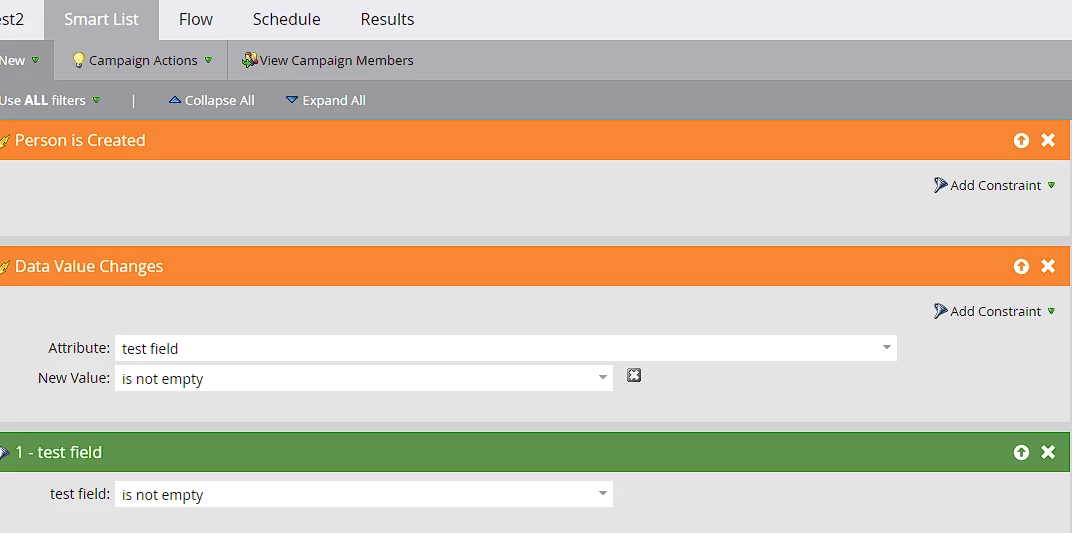
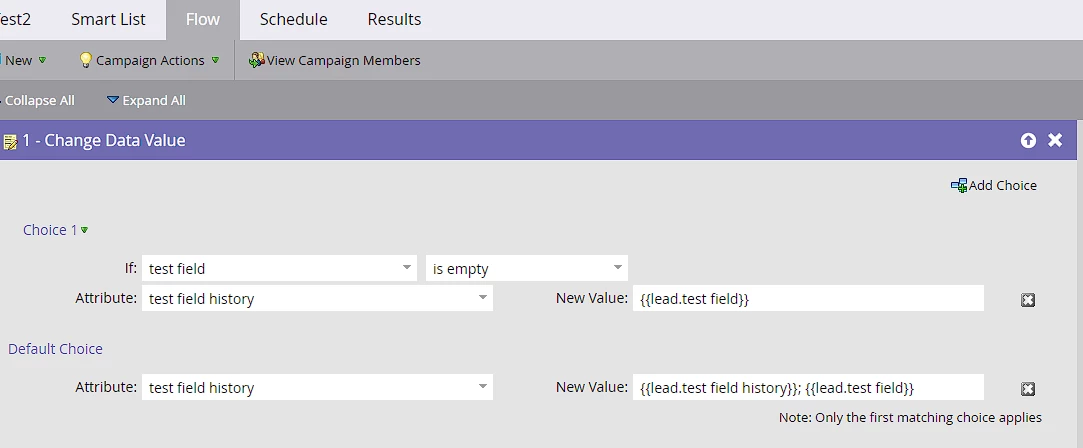
Yes, you can create a custom History field in which you append the value when a value in the original field changes (or a new person is created with a non-empty value in the field). Check out the below campaign setup:

Smart List:

Flow:

Set the campaign qualification rules to allow people to flow through the campaign multiple times. I hope this answers your question.


2 replies

Darshil_Shah1
Adobe Champion, Community Advisor, UG Leader
Darshil_Shah1Adobe Champion, Community Advisor, UG LeaderAccepted solution
Adobe Champion, Community Advisor, UG Leader
Mar 15, 2023 6:09 PM UTC

Yes, you can create a custom History field in which you append the value when a value in the original field changes (or a new person is created with a non-empty value in the field). Check out the below campaign setup:

Smart List:

Flow:

Set the campaign qualification rules to allow people to flow through the campaign multiple times. I hope this answers your question.


Translate
Level 2
Mar 15, 2023 9:46 PM UTC

Thank you so much, this is what I was looking for! Thank you also for the detailed answer.

Translate