Accessibility issue - Forms validation | Adobe Higher Education
Skip to main content
Level 2
October 4, 2022
解決済み

Accessibility issue - Forms validation

  • October 4, 2022
  • 2 の返信
  • 2309 ビュー

Hi, 
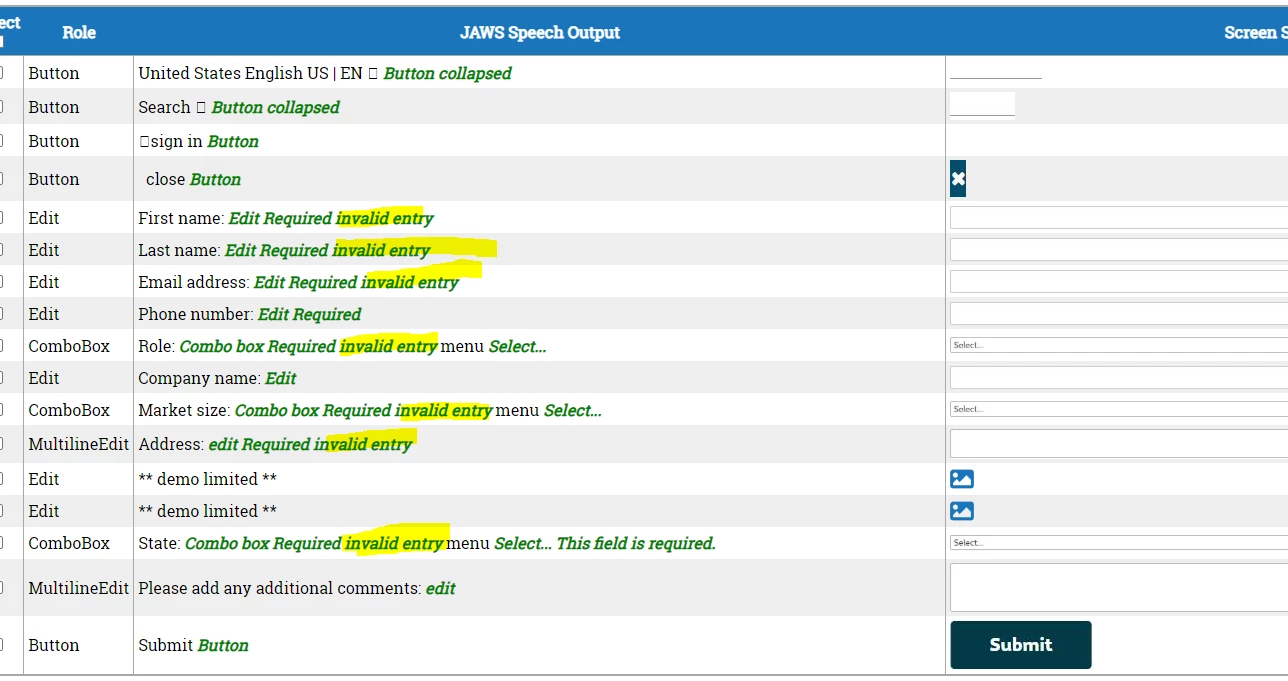
Our accessibility team has highlighted an error they have seen on Marketo forms that we have added for the first time to our CMS (AEM):

"When we check for the screen reader text, all the highlighted text below would get read out. They are the error messages for the form fields and this would be confusing for the end user. They are usually meant to be hidden until form validation occurs on submit. I believe this will impact all the new Marketo forms. Can you aresolve this issue if possible?"

The issues they see are highlighted below. Is this anything I can change myself or is it something that needs updating on the Marketo end?

 

このトピックへの返信は締め切られました。
ベストアンサー SanfordWhiteman

They're right. (You might expect me to argue based on precedent but nope!)


The only way to avoid this is to implement your own validation rules using the Forms 2.0 JS API (+ standard JS). Marketo’s validation includes setting aria-invalid on all fields.


2 の返信

SanfordWhiteman
Level 10
October 6, 2022

They're right. (You might expect me to argue based on precedent but nope!)


The only way to avoid this is to implement your own validation rules using the Forms 2.0 JS API (+ standard JS). Marketo’s validation includes setting aria-invalid on all fields.


Benjinc作成者
Level 2
October 6, 2022

Thanks Sandford, I will pass this on to my team.