Jul 2, 2013 1:21 PM UTC
Duplicate

Ability to see the full name when adding content to a Engagement Stream

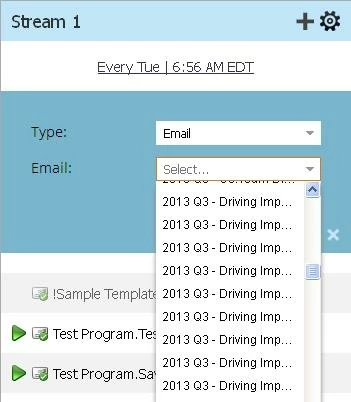
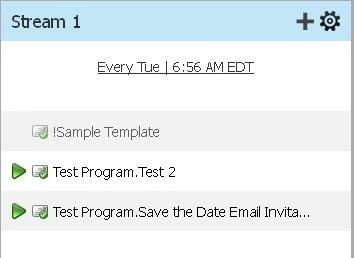
The Stream tiles don't allow you to see the full email or program name when adding content to the the Engagement Stream, which can make the odds of chosing the right content (especially emails in programs) pretty low.  Plus even after you've chosen it, the full name is cut off, so you still can't be sure that it is correct.  And you can't delete the conent if it is incorrect.  See screen shots below.  The UI needs to provide the ability to view the full name of the content before and after selecting it.

5 replies

Jul 2, 2013 1:32 PM UTC
Hi Elliott,
There is a little blue triangle at the end of the scrollbar, if you pull this out, you can expand the drop down list and make it wider.
I've discovered from Marketo support that you can delete the content - you need to hover over the right side of the band to get the gear icon, not over the name of the content.
Hope that helps.
Erica
Translate
Jul 10, 2013 3:52 AM UTC
Thanks Erica! The little blue triangle is a lot less than intuitive, but now that I know the secret handshake, it solves that problem.  But I still can't expand the names of the emails once they are in the stream..
Translate
Jul 10, 2013 8:46 AM UTC
I agree - once the emails are in the streams, it is impossible to see the full descriptors and as they always start with the program name, they are always truncated in the view.  It is a real drawback and Marketo need to do something about it.  Suggest that you raise a case.
Translate
Jul 10, 2013 1:59 PM UTC
Since part of my original Idea exists, Marketo set the status to "Already Have It", so I created a new Idea Ability to see the full name of an email in the Engagement Stream - please vote for it.
Translate
Feb 24, 2020 7:20 PM UTC
No text available
Translate