October 28, 2015
Question

A/B Test in Nurture Program Email Not Accepting Challenger

We have a Nurture program being updated and for one of the emails, we would like to test the email for click rates based on design/layout. I have created two versions of the same email - the difference is that one looks like a marketing email (Email A), the other looks like a sales rep sent it (Email B).

Here is how the Engagement Program is set up visually and the test emails are contained within the second program as assets:
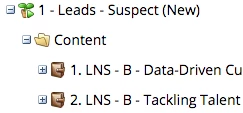
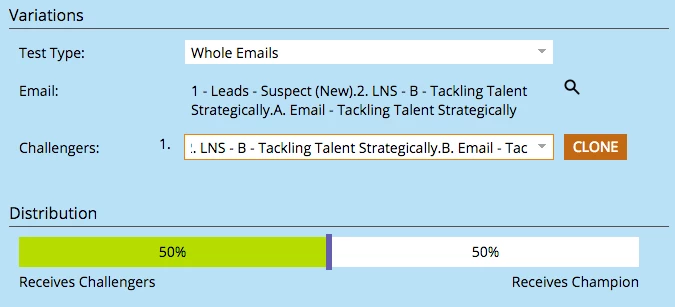
When I set up the testing items, I am not having success with the Challenger email saving. This is how I am selecting the Challenger (I am doing this right from Email A so that's why the Email is already chosen):
After I select the final items, I come to the summary page before clicking finish and get this:
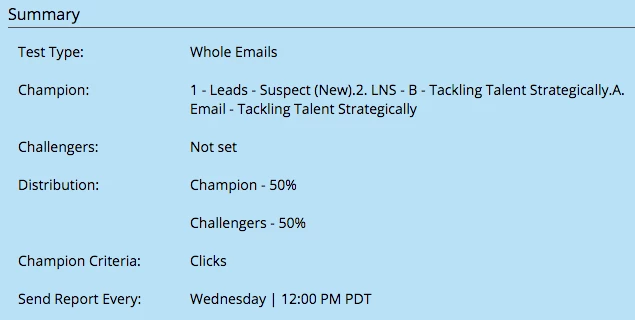
Is there a setting I am missing? Or is this not saving because Nurture Emails can't really be set up with A/B testing?

Any help/direction is appreciated!

Thanks in advance,

Michelle

This post is no longer active and is closed to new replies. Need help? Start a new post to ask your question.

6 replies

Grégoire_Miche2
Level 10
October 28, 2015

Hi Michelle,

I have never tried this, it's an interesting one. Probably a question for Cheryl Chavez​

An alternative would be not to use the A/B testing but just a smart campaign with a 50% Random Sample choice. It will not be as easy to set up and report on, but it would make the job.

-Greg

Translate
Josh_Hill13
Level 10
October 29, 2015

One issue I see is that you are using Dots for your names and while I haven't had an issue with this recently, it may be interfering with the Program names because a dot separates Program.Local Asset

Can you try cloning the emails out of the sub-Programs? I know this should be allowed, but I'm wondering if it is confusing the system somewhere.

Translate
October 29, 2015

Thanks for the suggestion Josh. I've done some testing to give everyone a little more information.

I tried re-naming the emails Email A and Email B to remove the . within the file name and I am still showing that no challenger has been set:

Then I cloned the individual emails out of the sub-program and into the top level folder for this Nurture Program, and still get that issue:

Then I tried moving the emails completely out of anything to do with Nurture/Engagement (in case that is what was making it fail to save) and still showing that the Challenger is not set:

To clarify, I am also setting the test from the email itself rather than from the Summary page (as I need to use this in a Nurture Program and don't have that option in the summary like you do for an Email Program).

If it is simply not working because I want it in the Nurture, I may work on using Greg's suggestion and setting up a smart campaign to split who gets what email - while the reporting wouldn't be a traditional A/B testing report, we can still see the open/click rates for each email, which is what I am trying to measure regardless.

Appreciate any further help and suggestions!

Michelle

Translate
Scott_McKeighe2
Level 4
October 29, 2015

Hey Michelle,

The Challenger/Champion function is only going to work for a trigger based email send (see this doc: Add an Email Champion/Challenger - Marketo Docs - Product Docs ).  I haven't tried anything but "default" program types as casted content for a Nurture Program. So you could try using an Email Program and see how that works.

In my opinion, your best bet to get the outcome you want is to use a Random Sample flow step to send your test variations like Greg suggests above.

Translate