Jan 25, 2016 7:58 AM UTC

3 Step Report to know how many daily leads we get

If you want to create a report that tells you the number of leads that have been created per day this is what you need to do.

1. Go to your Analytics Section and select the Leads Created by Month Report - this is one of your Leads Created by month reports.
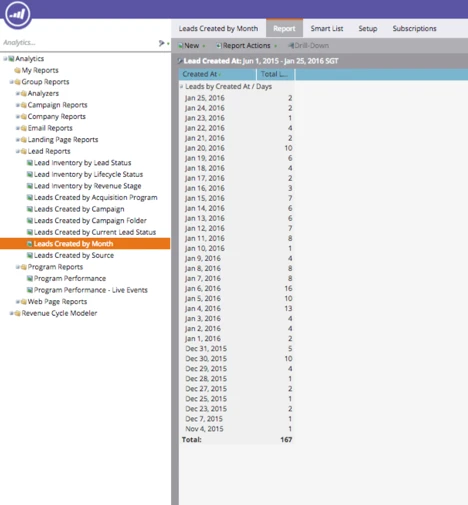
How to build it?

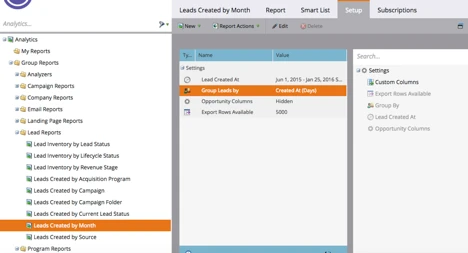
2. Go to Leads Created by Month / Setup

Click on ‘Group Leads by’
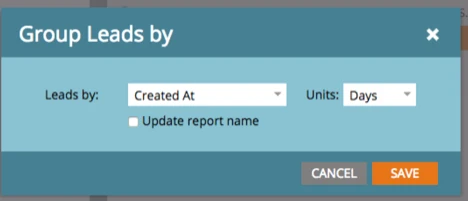
3. Change Units to Days:
This post is no longer active and is closed to new replies. Need help? Start a new post to ask your question.

7 replies

Feb 10, 2016 5:29 PM UTC

Great!

Translate
Lalida_Sriyords
Level 3
Apr 12, 2016 11:05 PM UTC

We do this as well and it's an awesome overview report to have for meetings and quick check-ups! Thanks for sharing!

Translate
Aug 30, 2016 5:46 AM UTC

Hey Karina,

Thanks for this useful process!

What would be the best way to get an understanding of your lead source performance by day?

Is there a method for using multiple groupings on the data?

Thanks for sharing!

Translate
Colin_Mann
Level 4
Aug 30, 2016 12:48 PM UTC

Useful as usual thanks.

Translate
Nikhil_Aggarwal
Level 1
Jun 13, 2017 11:29 AM UTC

Easy in understanding and useful too

Translate
Sujatha_Vutla
Level 4
Jun 19, 2017 6:54 AM UTC

Thanks

Translate
Deepak_Bhambri2
Level 2
Oct 31, 2017 6:23 AM UTC

Easy to understand. Thank you

Translate