ウェブパーソナライズの【ウェブキャンペーン】表示エラー | Community
Skip to main content
Level 1
June 18, 2026
Solved

ウェブパーソナライズの【ウェブキャンペーン】表示エラー

  • June 18, 2026
  • 1 reply
  • 31 views

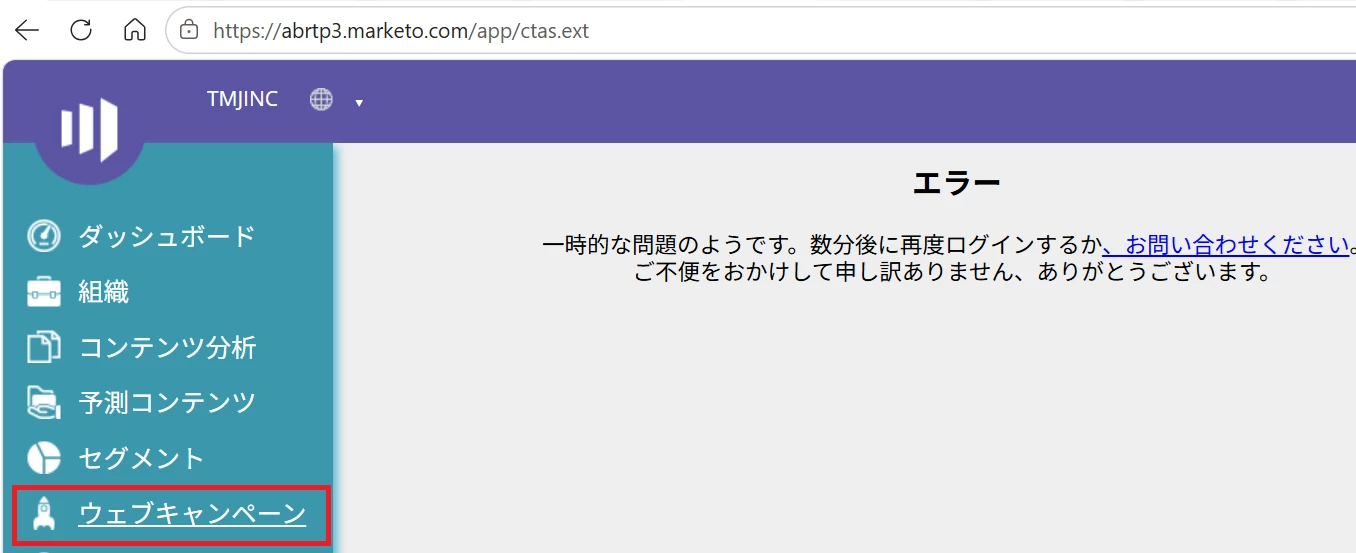
Marketoのウェブパーソナライズの【ウェブキャンペーン】がエラーとなり、

表示されません。


こちらご確認をお願いできませんでしょうか。


お手数をおかけいたします。


    Best answer by adesrala1

    Based on the screenshot this is an administrative UI crash inside the platform, not a live public website bug. When the Web Campaign menu throws a catastrophic error page, it points to either a browser token conflict or a localized database glitch.

    Step 1: Run a Quick Data Center Status Check

    Your workspace URL prefix abrtp3 means your account is hosted in the Ashburn data center on Real-Time Personalization (RTP) Pod 3.

    • Go to status.adobe.com.

    • Check Adobe Marketo Engage under the Marketo Ashburn region to verify if there are any active alerts specifically for RTP Pod 3 or Web Personalization.

    Step 2: Try a Clean Session Reset

    If the global status page is completely green, the culprit is likely a corrupted local authentication token.

    • Test in an Incognito/Private Window: Log in using a private browser session. This instantly rules out conflicting extensions (like heavy ad-blockers) or corrupt cookies dropping the page script.

    • Force a Refresh: Log out entirely, wait 5 minutes to let the backend session expire, clear your browser cookies for marketo.com, and log back in.

    Step 3: Open a Adobe Support Ticket Directly

    If you check the status page and it is green, but the error still persists even in an Incognito window, your specific account partition has a database glitch.

    Next step is to open a direct ticket with Adobe Support so an engineer can help from backend. 

    hopefully this helps!

    1 reply

    adesrala1Accepted solution
    Level 3
    June 18, 2026

    Based on the screenshot this is an administrative UI crash inside the platform, not a live public website bug. When the Web Campaign menu throws a catastrophic error page, it points to either a browser token conflict or a localized database glitch.

    Step 1: Run a Quick Data Center Status Check

    Your workspace URL prefix abrtp3 means your account is hosted in the Ashburn data center on Real-Time Personalization (RTP) Pod 3.

    • Go to status.adobe.com.

    • Check Adobe Marketo Engage under the Marketo Ashburn region to verify if there are any active alerts specifically for RTP Pod 3 or Web Personalization.

    Step 2: Try a Clean Session Reset

    If the global status page is completely green, the culprit is likely a corrupted local authentication token.

    • Test in an Incognito/Private Window: Log in using a private browser session. This instantly rules out conflicting extensions (like heavy ad-blockers) or corrupt cookies dropping the page script.

    • Force a Refresh: Log out entirely, wait 5 minutes to let the backend session expire, clear your browser cookies for marketo.com, and log back in.

    Step 3: Open a Adobe Support Ticket Directly

    If you check the status page and it is green, but the error still persists even in an Incognito window, your specific account partition has a database glitch.

    Next step is to open a direct ticket with Adobe Support so an engineer can help from backend. 

    hopefully this helps!

    Found this helpful? Mark the thread as solved so other community members can quickly locate the answer.